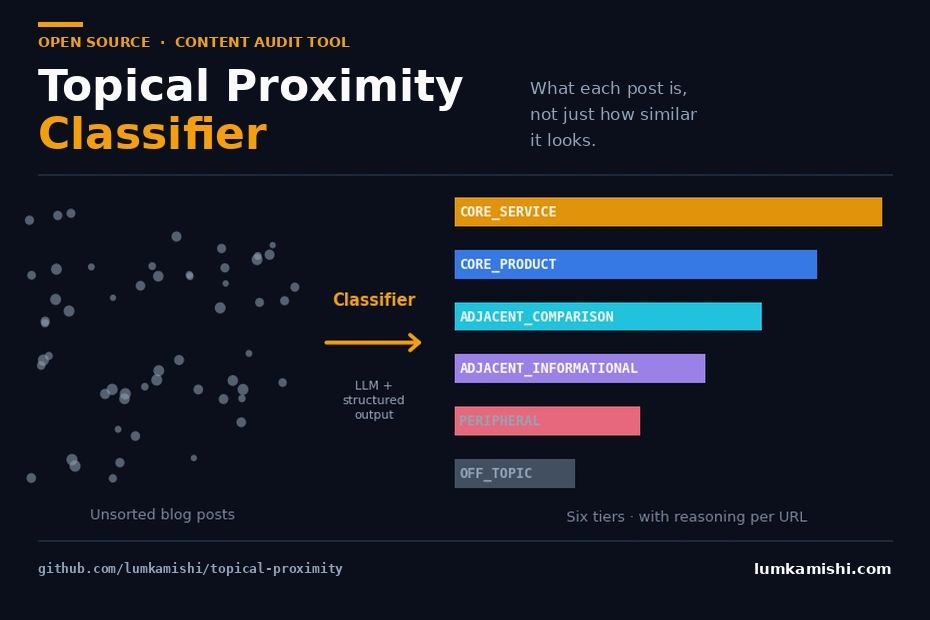
Content pruning in the context of SEO audits is a keep-kill-merge decision made against three metrics: traffic, topical alignment, and content quality. Run it wrong and you either leave dead weight dragging the domain down, or you delete pages that were quietly converting. This guide gives you the framework for that decision, plus a way to make it across hundreds of posts without reading each one by hand.
The hard part is defending each call to a stakeholder with reasoning that holds up. We cover the three metrics, why cosine similarity fails at topical scoring, an LLM-based classifier that replaces it, the 410-versus-301 mechanics that decide how a pruned page exits the index, and how to measure whether the prune worked.
What Content Pruning Does?
Content pruning audits a site’s content and then removes, consolidates, or refreshes underperforming or off-topic pages so the remaining pages rank higher. Each page gets one of three moves.
- Refresh. Keep the URL and improve it: expand thin sections, update stale facts, realign to search intent, add citations, fix on-page issues.
- Consolidate. Merge overlapping pages into one stronger page and 301 redirect the rest, so link equity and ranking signals concentrate instead of splitting across near-duplicates.
- Remove. Delete or redirect content that is obsolete, off-topic, and not worth the refresh effort.
This process differs from content updating in scope: updating improves pages you have already decided to keep, while pruning decides which pages survive at all.
Why Content Pruning Matters
Low-value pages actively work against the pages you want ranking.
- Topical clarity. When dozens of posts strays from what the business sells, they blur Google’s model of what the site is an authority on. Cutting the drift sharpens the signal for your commercial pages.
- Core update recovery. Core updates re-score topical authority and content quality across the whole domain, not page by page, so pruning is often the lever that recovers a site after a drop.
- Keyword cannibalization. Multiple pages chasing one intent split their signals and suppress each other. Consolidation fixes it, and detecting those cases is its own problem (see how to fix keyword cannibalization).
- Crawl budget. On large sites, thousands of low-value URLs burn crawl budget Google would otherwise spend on pages that convert.
Too many pages hurt you only when they are thin or off-topic; page count itself is not a penalty. A 10,000-page site of genuinely useful pages outranks a 200-page site of filler. Content-heavy sites benefit from rolling audits every one to three months in batches; smaller sites need it once or twice a year.
The Three Metrics Behind Every Pruning Decision
Every defensible pruning decision reduces to three metrics, and you weigh all three before touching a page.
- Traffic. Traffic per page or cluster, the share of total site traffic a page brings, and traffic shifts before and after core updates. That last signal is what delta reporting surfaces.
- Topical. How relevant a page’s ranked queries are to its own topic, and how relevant the page is to the site’s core topic. Most audits break here, and the rest of this guide focuses on getting it right.
- Content quality. The unquantifiable one, still requiring an SEO-trained human for the final call. Quantifying it programmatically at the claim level rather than the vibes level is a separate problem, which is what Assertio is being built to do.
This maps to the 80/20 rule that governs most content libraries: roughly 20% of your pages drive around 80% of organic traffic. [VERIFY: exact distribution varies by site] Pruning protects that 20% by removing the long tail that consumes crawl budget and dilutes topical signals while contributing almost nothing.
Generic AI audit tools score the topical metric with vector embeddings and cosine similarity, and that is where the mess starts.
The Pruning Checklist: Commercial Role and Topical Alignment
Before any tool, answer these for each page.
- Which pieces support a service the business sells with content that converts?
- Which posts are reviews or comparisons that do not directly support a service but might still earn topical authority?
- Which posts have drifted far enough off-topic to hurt the site’s clarity in Google’s eyes, even while pulling a few visits?
- Which posts are duplicates competing for the same query?
- For everything in the middle, is the right action refresh, merge, redirect, or delete?
The challenge is answering these at scale, with stakeholder-grade reasoning, without 80 hours of manual reading. The usual tools fail this specific job:
- Cosine similarity finds shared vocabulary. It cannot separate two posts that both mention “fiber cement siding” but serve different commercial roles, and it needs arbitrary threshold tuning before it is actionable.
- Manual classification works but does not scale. A consultant charging $5k cannot spend 30 hours reading 400 posts and still make margin.
Why Cosine Similarity is the Wrong Tool for Content Pruning?
Embeddings encode the semantic similarity of language, placing related concepts close together in vector space so search and clustering work. They do not encode commercial role, buyer journey stage, content format, or alignment to a specific business’s offering. Those are reasoning tasks, and a similarity score cannot produce them.
One example shows the failure. A project management SaaS has a 400-post blog built over four years. Two of the posts:
- How to run effective sprint retrospectives
- The 12 best sprint retrospective tools in 2026
Cosine similarity on their embeddings returns roughly 0.91, so a cosine-based audit flags them as cannibalization candidates and recommends a merge. Read them by hand and they cannibalize nothing, because they target two different personas.
The first is top-of-funnel education for a scrum master searching retrospective formats, not software; it builds topical authority but drives few trials. The second is a bottom-of-funnel commercial comparison for someone actively evaluating tools, three clicks from signup, probably ranking the SaaS’s own product in position one or two. Merge them and you destroy the page that converts, because cosine reads language similarity, not commercial role.
A Topical Classifier That Reasons About Each Post
Replace the similarity score with reasoning. Topical Proximity Classifier is an open-source content audit classifier built for this. Instead of an embedding model, it uses an LLM with structured output: GPT-5.4 via the OpenAI API with a Pydantic-defined schema, or Claude Sonnet 4.6 via Anthropic’s tool_use constraint, depending on API budget. It is free and lives on GitHub.
Given the services config plus the post content, the model returns an explicit decision on each audit dimension: which service the post supports, how directly, its content type, its commercial intent, and a final pruning tier, each with a paragraph of reasoning. A similarity score cannot answer any of those.
Run the Classifier against a 20-post sample for a hypothetical California solar installer (“Helios Solar”) and the three Tesla Powerwall posts sort cleanly by commercial role.
| Post | Tier | post_type | commercial_intent |
|---|---|---|---|
| Tesla Powerwall 3 Review: Is It Worth It? | CORE_PRODUCT |
PRODUCT_REVIEW | MEDIUM |
| Tesla Powerwall vs Enphase IQ Battery | ADJACENT_COMPARISON |
COMPARISON | MEDIUM |
| Tesla Powerwall Installation Cost: Complete Breakdown | CORE_SERVICE |
SERVICE_INTENT | HIGH |
Three posts about one product, three roles, three pruning actions. No single similarity float produces that separation.
How the Classifier Works?
The flow is five steps.
- Load a services config describing the business: services offered, with in-scope and out-of-scope examples.
- For each post in the audit CSV, build a prompt containing the services config plus the post’s title and content (or an extracted summary).
- Send it to GPT-5.4 or Claude Sonnet 4.6 with a structured-output parameter (
response_formaton OpenAI,tool_useon Anthropic) pointing at a Pydantic schema defining seven fields:service,service_alignment,post_type,commercial_intent,tier,reasoning,overridden. - The API guarantees valid JSON matching the schema, so the model cannot return free text or invent field names.
- The seven fields append to the original CSV as new columns.
| Cosine similarity | Topical Proximity Classifier | |
|---|---|---|
| Core technology | Vector arithmetic on text embeddings | LLM reasoning with structured output |
| Knowledge source | Embedding model’s training corpus | Services config + post content + LLM reasoning |
| Output | Single float per pair | Multi-dimensional typed object per post |
| Cost per 500 posts | ~$0.05 | ~$2 to $3 |
| Knows your business | No | Yes, via the services config |
| Produces reasoning | No | Yes, one paragraph per classification |
Who is This For?
This fits SEO consultants running client blog audits, in-house SEO leads at content-heavy businesses, and agencies selling fixed-scope audits. The common thread is needing defensible keep-or-prune decisions across hundreds of posts without 30 hours of reading.
How to Run a Content Audit With the Topical Proximity Classifier?
Setting it up
Have three things ready.
- Python 3.10 or higher installed locally
- An OpenAI API key with GPT-5.4 access, or a Claude API key
- Your blog posts exported to a CSV with at least three columns: URL, title, and full post content
Install is four commands; run them inside a virtual environment so you do not pollute your system Python.
python -m venv .venv
source .venv/bin/activate
git clone https://github.com/lumkamishi/topical-proximity.git
cd topical-proximity
pip install -e .
Then set your API key as an environment variable. In PowerShell that is $env:OPENAI_API_KEY="sk-..." or $env:ANTHROPIC_API_KEY="...".
Writing the services config
The services file tells the Classifier what counts as on-topic, off-topic, core service, and peripheral, so a vague file produces vague classifications. Spend twenty minutes on it. Use four columns per service.
| service_name | description | in_scope_examples | out_of_scope_examples |
|---|---|---|---|
| Task Management | Core task tracking, assignment, and workflow features | task prioritization, workflow automation, assignment best practices | general productivity, time tracking software reviews |
| Sprint Planning | Agile sprint planning and retrospective tooling | sprint planning templates, retrospective formats, velocity tracking | scrum theory unrelated to tooling, certification advice |
| Team Collaboration | Real-time collaboration, comments, mentions, notifications | async communication workflows, team coordination patterns | Slack vs Teams comparisons, general remote work advice |
The negative examples matter as much as the positive ones, because they keep drift content out of the core tier. Pull the blog audit file from a Screaming Frog crawl, a CMS export, or a script hitting your sitemap or RSS. With both files ready, run the classifier.
topical-proximity classify \
  --services services.csv \
  --audit blog_audit.csv \
  --output classified.csv
The Classifier runs a first-pass classification, a verification pass to catch edge cases, and writes everything to classified.csv.
Reading the output
classified.csv carries your original three columns plus seven new ones.
| Column | What it tells you |
|---|---|
service |
Which service the post supports, or NONE |
service_alignment |
How directly the post supports that service (0.0 to 1.0) |
post_type |
Content category: SERVICE_INTENT, PRODUCT_REVIEW, COMPARISON, EDUCATIONAL, DRIFT |
commercial_intent |
HIGH, MEDIUM, or LOW purchase proximity |
tier |
The pruning verdict: CORE_SERVICE, CORE_PRODUCT, ADJACENT_COMPARISON, DRIFT, and so on |
reasoning |
One paragraph justifying the tier, for the stakeholder |
overridden |
Whether the verification pass changed the first-pass call |
Sort by tier and commercial_intent descending. CORE_SERVICE and CORE_PRODUCT rows with HIGH intent are your protected 20%: refresh them, never delete them. DRIFT rows with LOW intent and low traffic are your delete or redirect candidates.
Redirect or Delete: 301, 410, Noindex, and Canonical
The tier tells you which pages exit. The exit method decides how they leave the index, and getting it wrong either bleeds link equity or leaves zombie URLs crawling for months.
- 301 redirect when the pruned page has backlinks or lingering traffic and a genuinely relevant target exists. The 301 passes the large majority of link equity to the target [VERIFY: current equity-pass figure per Google], which is why consolidation always redirects the merged pages rather than deleting them. Never 301 to an irrelevant page like the homepage; Google treats an irrelevant redirect as a soft 404 and drops the equity anyway.
- 410 Gone when the page is obsolete, has no backlinks, and has no relevant target. A 410 tells Google the page is permanently gone, and Google drops 410 URLs from the index faster than 404s. John Mueller has stated that 410 and 404 are treated almost identically over the long run, with 410 processed slightly quicker in the short term. [VERIFY: exact Mueller quote and source]
- 404 is acceptable for the same case as 410 if your CMS cannot serve a 410. It works, just marginally slower to deindex.
Run the Classifier on your own blog export to get a tier and one paragraph of reasoning per post, then work the DRIFT and LOW-intent rows first.
Example Run
Here’s a real output from a test run:
| Title | tier | service_alignment | post_type | commercial_intent |
|---|---|---|---|---|
| How Much Does Solar Installation Cost in 2025? | CORE_SERVICE |
0.95 | SERVICE_INTENT | HIGH |
| Tesla Powerwall 3 Review: Is It Worth It? | CORE_PRODUCT |
0.70 | PRODUCT_REVIEW | MEDIUM |
| Monocrystalline vs Polycrystalline Solar Panels | ADJACENT_COMPARISON |
0.65 | COMPARISON | MEDIUM |
| How Solar Panels Actually Work: The Science | ADJACENT_INFORMATIONAL |
0.45 | EDUCATIONAL | LOW |
| 10 Beautiful Solar Roof Designs | PERIPHERAL |
0.35 | DESIGN_INSPIRATION | LOW |
| Smart Thermostats for Energy Savings | OFF_TOPIC |
0.10 | DRIFT | LOW |
Each row also includes a reasoning column (truncated here for space). Example reasoning for the Tesla Powerwall Installation Cost post:
“This post is about the cost of installing a Tesla Powerwall, covering labor, permits, and panel integration — all of which are core components of Helios Solar’s Battery Backup Systems service. The reader is a homeowner actively evaluating whether to purchase and install a Powerwall, making this close-to-hire intent. The next action would likely be requesting a quote from a local installer.”
Limitations
Every tool has its limitations. This one as well. Here are some caveats worth knowing about before using it:
- The classifier is only as good as your services config. If
services.csvdoesn’t accurately describe what the business sells, the alignment scores will be wrong. The twenty minutes you spend on that file determines the quality of the entire output. - The
post_typetaxonomy is opinionated. It’s tuned for service businesses: renovation, legal, contracting, professional services, B2B SaaS with a service layer. It works for pure-product SaaS with some interpretation. - No SERP grounding (yet). The current version classifies posts based on their content and the services config alone. It doesn’t pull SERP data to verify how Google actually treats each URL and each query. Adding SERP analysis via a paid SERP API (DataForSEO, Serper, SerpAPI) or scraping would meaningfully improve the quality of the output, particularly anything sitting in
ADJACENT_COMPARISONorPERIPHERAL. However, the cost trade-off is real. API calls run $0.50 to $2.00 per 1,000 queries depending on provider, which would push a 500-post audit from $2–3 to $5–15 total. If you’re using this and have thoughts on integrating SERP data, open an issue and tell me how you’d integrate it. - LLMs have a randomness factor built in. Run the same input twice and you’ll get ~95% identical output, with the remaining 5% being edge cases on borderline content.
- Like every AI tool, this one doesn’t replace human judgement. The
tiercolumn tells you what the classifier thinks. You still need to review the borderline cases, particularly anything sitting inADJACENT_COMPARISONorPERIPHERAL. The tool exists to do the 80% of the work that’s mechanical so you can spend your time on the 20% that requires actual thinking.
Before Running
Don’t run it on your full blog the first time. Run it on a sample of 20–30 posts that you already know well — ones where you have a strong intuition about whether they should stay or go. Check the reasoning column on each one. If the calls match your intuition, you can trust the full run.
Tune the services.csv file, re-run the sample, repeat until the output matches your judgement on the cases you already know. Then run the full audit, use it and tell me what’s not working. The repo is at github.com/lumkamishi/topical-proximity. Issues and PRs welcome. Specifically interested in:
- Taxonomy proposals for verticals beyond service businesses
- Edge cases where the classifier confidently picks the wrong tier
- Performance optimizations for audits over 10,000 posts
If you’d rather have someone else run it against your blog with a proper services config and reviewed output, I do that as a fixed-scope audit. Get in Touch!