
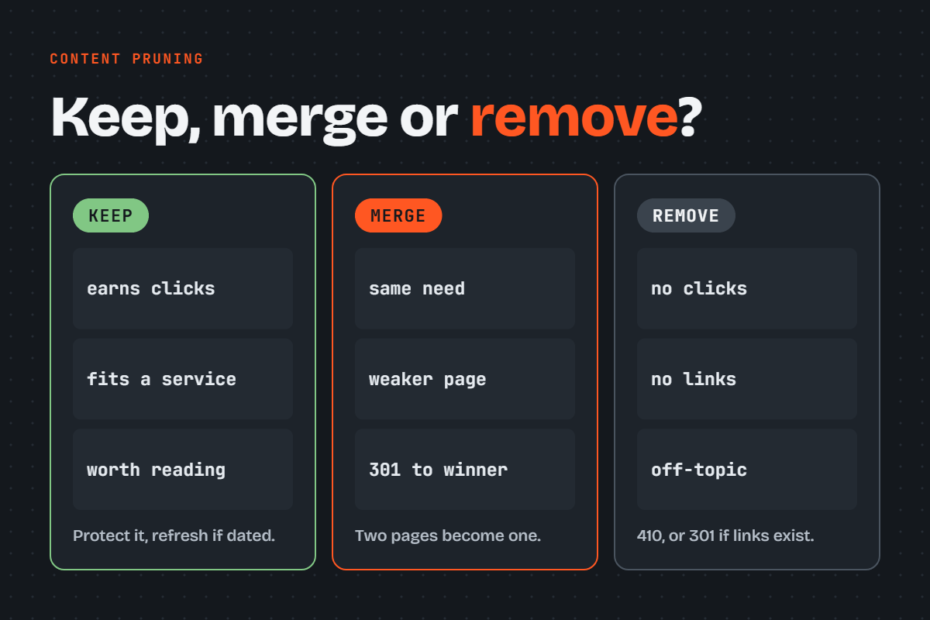
Content pruning within SEO content audits involves evaluating indexable pages using a keep-kill-merge framework based on three key metrics: organic traffic, topical alignment, and content quality. This process yields decision rules, appropriate exit methods for removed URLs, scalable classification methods for large archives, and a structured before-and-after tracking framework.
What is Content Pruning?
Content pruning systematically audits every indexable page on a site, assigning each to one of three specific outcomes to maintain high topical and commercial signal clarity without dilution. These three outcomes address the standard “three types of pruning”:
- Refresh: Retain the existing URL and enhance its content by expanding thin sections, updating outdated information, realigning with target search intent, adding reliable references, and resolving technical on-page issues.
- Consolidate: Merge overlapping or cannibalizing pages into a single authoritative URL, applying 301 redirects to consolidate link equity and ranking signals.
- Remove: Delete or redirect obsolete, off-topic, or low-value content where a refresh would yield an inadequate return.
Content pruning vs content refreshing
Pruning and refreshing differ primarily in scope. Pruning determines which pages should survive, whereas refreshing enhances the specific pages selected for retention.
A refresh workflow takes place after the pruning phase on the retained pages. For each page being refreshed, update the title tag and introductory section to target queries generating high impressions in Search Console, update dated figures, and add internal links from the consolidated URLs.
Why Content Pruning Impacts Rankings
Pruning mitigates the negative drag low-value pages exert on core pages through four key mechanisms:
- Topical Clarity: Off-topic or low-quality content dilutes site authority, obscuring Google’s understanding of the site’s primary niche and weakening topical support for core commercial pages.
- Core Update Recovery: Following Google’s integration of helpful content signals into its core ranking systems in March 2024, site quality is evaluated holistically. A high ratio of unhelpful pages can suppress overall site rankings; thus, pruning serves as a primary lever for recovering from core update impacts.
- Keyword Cannibalization: Multiple URLs competing for the same query intent split internal link equity and ranking signals until consolidated.
- Crawl Budget: Crawl budget limitations primarily affect enterprise sites with over 1 million weekly-changing pages or 10,000 daily-changing pages. On smaller sites, pruning delivers value by raising overall site quality and structural clarity rather than optimizing crawl resources.
Total page count does not trigger a penalty; a 10,000-page site with high-value content will outperform a 200-page site composed of low-quality filler.
Blog posts remain valuable for SEO in 2026 provided they support core commercial offerings or directly address target customer queries, rather than existing solely to meet publishing quotas. Content-heavy platforms benefit from rolling audits every 1 to 3 months, whereas smaller websites typically require only 1 to 2 audits per year.
The Three Core Metrics Behind Every Pruning Decision
Prior to making structural changes, evaluate every page across three primary metrics:
| Metric | What It Answers | Data Source | Decision Owner |
| Traffic | Does the page generate organic clicks, conversions, or backlink equity? | Google Search Console, GA4, Ahrefs / Semrush | Automated Script or Analyst |
| Topical Alignment | Does the content directly support the company’s core services or products? | Core service catalog mapped against page content | Classification Model, refined by Human Review |
| Content Quality | Is the information accurate, up to date, and superior to current search results? | Manual Review | SEO Analyst / Subject Matter Expert |
While traffic and alignment metrics can be processed programmatically, final content quality evaluations require human review. Evaluating factual accuracy at scale is the specific challenge addressed by Assertio, a content intelligence tool designed to extract page-level factual assertions and identify discrepancies.
Traffic: Clicks, Conversions, and Backlinks
Pull a full 12 months of performance data to account for seasonal traffic fluctuations. In Google Search Console’s Performance report, set the timeframe to 12 months, open the Pages tab, and export clicks, impressions, CTR, and average position for each URL.
Because standard interface exports cap at 1,000 rows, larger sites should utilize the Search Console API or the Looker Studio connector.
In GA4, navigate to the Landing Page report, filter by the Organic Search default channel group, and include key events as a primary metric column. Combine this with referring domain counts per URL from Ahrefs or Semrush, and join the dataset with a Screaming Frog site crawl to include indexability status, word count, internal link count, and canonical tags for every row.
Topical Alignment: Supporting Core Offerings
Define the business’s explicit services or product lines, establishing clear parameters for what falls within and outside scope. Evaluate each page against this master list, documenting the supported service line, degree of relevance, and user purchase intent.
Embedding-based similarity models often fail at this step by treating intent-divergent queries, such as “Tesla Powerwall installation cost” (commercial intent) and “Tesla Powerwall review” (informational research), as duplicates due to shared semantic vocabulary.
Evaluating alignment requires business-level context rather than pure semantic distance scores. Manually reviewing large blog archives can require significant time. The free Topical Proximity Classifier assists with the initial pass by comparing each post to the service catalog and outputting the matching service, alignment score, content type, commercial intent category, and written rationale. Borderline classifications are then escalated for manual review.
Quality: Evaluating Content Standards
Human review remains essential for quality assessment. Evaluate pages against Google’s helpful content guidelines, assessing whether the page provides unique insights, original value relative to higher-ranking competitors, and authoritative factual accuracy. Verify all dates and numerical figures, as outdated data represents a frequent point of failure for topically aligned pages. Word count serves merely as a sorting indicator; concise pages that answer narrow queries completely are effective, whereas lengthy pages that mirror competitor content without adding unique value are considered thin.
Decision Rules Matrix
Combining traffic, alignment, and quality data produces clear actionable outcomes. The baseline framework includes the following decision rules:
| Performance | Alignment | Quality | Decision |
| Generates Clicks / Conversions | Core Service | High Quality | Keep & Protect |
| Generates Clicks / Conversions | Core Service | Outdated / Thin | Keep & Refresh |
| Any Traffic Level | Duplicate Intent of Stronger Page | Any Quality | Merge into stronger page |
| Low Traffic | Core Service | High Quality | Keep, add internal links, optimize for target query |
| Low Traffic | Adjacent (Comparisons, Guides) | Any Quality | Human Review |
| Low Clicks / Links | Off-Topic | Any Quality | Redirect to closest relevant page, or Remove |
| Zero Clicks, Conversions, or Links | Off-Topic / Drift | Any Quality | Remove |
Absolute metrics for “low traffic” vary by business context. A B2B article generating 30 high-intent clicks monthly may deliver higher business value than a consumer lifestyle article earning 3,000 visits. Consequently, set thresholds relative to site-specific benchmarks.
A reliable starting batch for removal consists of indexable URLs with zero organic clicks over 12 months, zero key events, and zero referring domains. Commercial scope guides adjacent content decisions: product comparisons directly support sales cycles despite moderate traffic, whereas unaligned general educational explainers usually provide insufficient value to retain.
Step-by-Step Content Pruning Implementation Guide
- Compile the Master URL List: Combine a live site crawl with XML sitemap entries to ensure orphaned URLs are included.
- Integrate Performance Data: Merge 12 months of Search Console data, GA4 key events, and external backlink metrics mapped to each URL.
- Score Topical Alignment: Evaluate each page against core service lines manually or use an automated classifier to identify borderline cases for review.
- Conduct Quality Audits on Middle-Tier Pages: Focus manual evaluation efforts on adjacent and borderline pages rather than clearly protected or zero-value URLs.
- Assign Action Plans & Rationale: Assign an explicit decision, exit method, and concise justification for every URL to share with stakeholders.
- Execute Implementation in Batches: Process changes in phased releases starting with definitive removals, followed by consolidations, and concluding with refreshes, logging dates for each batch.
- Post-Batch Cleanup: Remove broken internal links pointing to pruned URLs, update XML sitemaps, and refresh navigation menus and internal recommendation modules.
- Analyze Performance Gains: Measure post-implementation performance against the baseline change log across identical time intervals.
Executing Exit Methods for Removed Content
The assigned decision dictates which pages are removed, while the exit method governs link equity preservation and indexing removal timelines:
| Page Situation | Exit Method | HTTP Status / Tag |
| Has backlink equity or traffic, with an equivalent page available | Permanent Redirect to relevant page | 301 Redirect |
| Merged into a consolidated target page | Permanent Redirect to consolidated page | 301 Redirect |
| Obsolete, no backlinks, no equivalent topic page | Direct Removal | 410 Gone or 404 Not Found |
| Thin / utility content required for site users | Remove from index, keep page accessible | 200 OK with noindex |
| Near-duplicate page required to remain published | Pass signal authority to canonical page | 200 OK with rel="canonical" |
Redirect URLs exclusively to pages serving identical search intent. Redirecting pruned URLs to non-relevant destinations (such as the homepage) triggers soft 404 classifications by Google, invalidating equity transfer. Ensure redirects point directly to final destination URLs to prevent redirect chains.
Per Google guidelines, standard 3xx redirects preserve signal authority without PageRank loss. Google processes 410 Gone header signals slightly faster than standard 404 Not Found codes, though both achieve identical long-term results; 404 status codes remain acceptable when CMS configuration limits 410 deployment. Retain 301 redirects for at least one year, maintaining them as long as external backlinks point to the origin URL.
Never implement noindex tags or canonical directives alongside robots.txt disallow rules on the same URL, as crawling blocks prevent search engines from parsing page-level directives.
Page Consolidation Workflow
First, identify the destination URL, selecting the page with the highest historical click volume, backlink count, or optimal URL structure. Next, extract valuable sections, stats, and unique insights from secondary pages and integrate them into the primary URL, updating its title tag and introductory content around the top-performing search queries across the consolidated group.
Apply 301 redirects from all deprecated URLs to the destination page, update existing internal links to point directly to the destination URL, and remove old entries from XML sitemaps. For WordPress sites, utilization of a dedicated redirect management plugin is recommended. For bulk consolidations, import mapping pairs via CSV and validate routing behaviors using tools like Screaming Frog in List Mode prior to deployment.
Measuring Post-Pruning Performance
Maintain a change log detailing deployment dates and affected URLs for each batch to ensure accurate baseline comparisons. Use the Compare feature in Google Search Console’s Performance report to evaluate equal timeframes before and after changes, filtering data specifically for retained and refreshed URLs.
Monitor three primary performance metrics:
-
Organic clicks to retained and refreshed pages
-
Total indexed URL counts via the Search Console Page Indexing report
-
Organic landing page key event conversions in GA4
Overall site click volume may temporarily decrease following the removal of low-traffic pages; this outcome is acceptable provided conversion volume and organic clicks to retained pages increase. Allow a evaluation period of 2 to 3 months to assess pruning outcomes, conducting follow-up analyses after subsequent Google core updates, as sitewide quality recalibrations frequently manifest during core rollouts.
Frequently Asked Questions
How often should content pruning be performed?
Content-heavy websites benefit from rolling audit batches every 1 to 3 months. Smaller sites generally require audits 1 to 2 times per year. Additionally, sites experiencing traffic drops following a Google core update should conduct a full pruning audit.
Does deleting pages harm SEO performance?
Deleting pages that generate no organic traffic, backlinks, or conversions does not negatively affect SEO, and removing unhelpful content can improve overall site performance. Negative impacts occur when pages with active conversion value or backlink equity are deleted without 301 redirects, which is why performance and link metrics must be verified before removal.
Should pages be set to noindex instead of being deleted?
Use noindex directives only for pages that must remain accessible to users, such as utility or policy pages. Because noindex pages consume crawl resources and require maintenance, pages with no user or business utility should be deleted or redirected.
What is the key difference between content pruning and content refreshing?
Pruning determines which pages should be retained, merged, or removed across the site. Refreshing improves the specific pages designated for retention and is executed after the pruning process is complete.
Starting the Pruning Process
Begin by exporting 12 months of Google Search Console performance data, joining it with GA4 key event tracking and backlink metrics. Isolate every URL exhibiting zero clicks, zero conversions, and zero referring domains; this dataset forms the initial batch for removal and requires minimal evaluation. Complete topical alignment and quality evaluations for all remaining URLs prior to making final retention decisions. Alternatively, a comprehensive content audit service can evaluate pages across all three metrics to provide a structured keep, merge, and remove implementation plan supported by page-level rationales.