
You open your analytics dashboard to diagnose a slump in traffic, only to find thousands of auto-generated URLs competing against each other for the exact same query. That ruins your day doesn’t it?
Traditional SEO guides tell you to pick one primary keyword per article, write a comprehensive post, and build backlinks.
That advice won’t work on a two-sided marketplace because you cannot manually research queries for 50,000 individual inventory pages. Marketplace SEO keyword research requires you to map search queries to scalable page templates rather than individual URLs, while splitting your research into separate pipelines for buyers and sellers.
Working through these eight steps in order keeps your inventory indexed, eliminates internal keyword cannibalization, and matches every user search to an intent-aligned page:
- List your page templates and separate your buyer and seller audiences.
- Build buyer and seller seed lists.
- Expand your seeds with autocomplete and site search logs.
- Find the keywords competitors rank for across their own page types.
- Measure volume, difficulty, and intent using keyword tools.
- Cluster keywords by search intent using search result overlap.
- Map keyword clusters to programmatic page templates.
- Track rankings by template in Google Search Console.
How do you do keyword research for marketplace SEO?
Marketplace keyword research succeeds when you assign keyword clusters to URL templates instead of individual pages. A standard e-commerce store sells products under one brand and optimizes a handful of product and collection pages. A two-sided marketplace serves two distinct audiences with conflicting search intents: buyers looking for items or services, and sellers looking for demand, income, or listing tools.
Mixing these two groups into a single keyword list confuses search engines. A searcher typing “vintage camera repair” wants to hire a professional, while someone searching “sell vintage cameras online” wants a platform with low fees and high buyer traffic. If you group these queries into the same bucket, your onboarding landing pages will compete directly against your inventory browse pages.
Beyond audience separation, marketplaces operate on programmatic architecture. An operator cannot write individual meta tags or manual copy for 20,000 product listings or 300 regional service hubs. Instead, you conduct keyword research to identify recurring search patterns, modifiers, and volume thresholds. You then apply those findings to URL rules and metadata formulas across your site templates.
Step 1: List your page templates and both audiences
Before opening any keyword tool, catalog your site’s URL structure. A typical marketplace relies on seven core page templates: listing, category, seller signup, search, filter, sort, and expired pages. Each template fulfills a specific role for either the supply side or the demand side of your platform.
Buyer side: Category pages, category plus location pages, listing pagesSeller side: Seller acquisition landing pages, merchant onboarding hubsInternal site mechanics: Filter pages, sort pages, expired listing URLs
Listing count dictates whether a category deserves to target a search query. Search engines quickly flag thin pages as soft 404 errors when a URL contains no inventory. To prevent indexation waste and soft 404 flags, ensure the resulting page returns at least one active listing, with populated attributes across at least 85% of live inventory in that category.
Once your listing counts meet this baseline, determine which page templates to generate programmatically. Category hubs, regional hubs (category plus city), and brand-specific filter combinations can all be generated from listing database attributes. Setting these boundaries early prevents your site from indexing millions of zero-inventory filter combinations.
Step 2: Build buyer and seller seed lists
With your templates catalogued, move on to seed keywords. Every research project starts with them, but a marketplace requires two distinct seed lists. Buyer seed lists capture transactional and discovery terms around products, rentals, or tasks. Seller seed lists capture commercial terms around monetizing assets, finding freelance clients, or expanding retail sales channels.
For a peer-to-peer campervan rental marketplace, the lists look entirely different:
- Buyer seeds: “campervan rental”, “hire a camper van”, “sprinter van trip hire”, “glamping van rent”.
- Seller seeds: “rent out my campervan”, “earn money with RV”, “campervan listing platform”, “list RV for rent”.
Avoid using internal taxonomy names for your seeds. Internal naming conventions frequently reflect engineering or operational jargon rather than natural human search patterns. A marketplace database might label an inventory bucket “commercial light duty haulers”, but buyers search for “flatbed truck rental”.
To find what real customers call your inventory, look at customer support tickets, onboarding forms, and user-generated listing titles. Support logs show the exact phrasing frustrated buyers use when browsing fails. Seller onboarding answers reveal how merchants describe their businesses before your platform forces them into predefined categories.
Step 3: Expand seeds with autocomplete and site search
A short seed list provides the foundation, but your catalog needs long-tail variations to capture specific intent. Free platforms such as Google Autocomplete, Google Trends, and Google Search Console queries reports show actual phrases searchers type. Enter a seed term and step through letters of the alphabet to surface specific modifiers, including sizes, use cases, and technical specifications.
Your internal site search log is the most specific data source you have. When visitors search your marketplace directly, they tell you what they expect to find and cannot spot in your main navigation. A high volume of searches for “pet friendly campervans in Denver” indicates immediate demand for a dedicated attribute filter or an indexed landing page.
Recurring modifiers from these logs should guide your taxonomy rather than exist as one-off keywords. If site search logs repeatedly show brand, location, or condition modifiers, turn those modifiers into programmatic filters or dedicated subcategory pages. Doing this across all qualifying categories captures long-tail search volume automatically.
Step 4: Find the keywords competitors rank for
Beyond your own logs, your direct competitors and legacy directories have already tested which search queries convert. Enter competitor domains into an organic research tool to identify their top-ranking landing pages. Group their ranking URLs by template type to evaluate how they structure their catalog.
Look closely at the specific page type your rival uses to rank for a query:
- Category page ranking: Signals high-level discovery where the user wants to browse multiple options.
- Listing page ranking: Signals exact-match intent where the user searches for a specific model, serial number, or maker.
- Location page ranking: Signals regional or local intent requiring physical proximity.
Pay special attention to ranking gaps. If legacy directories rank with outdated, slow, or thin directory listings for a cluster, your structured category page can outrank them.
Step 5: Measure volume, difficulty and intent
Once you have assembled a master list of queries, qualify each term with real metrics. Using the right tool for your current scale prevents overspending on software while providing the search volume and competitive difficulty necessary to prioritize your rollout.
The following table compares the primary keyword research tools available for marketplace operators:
| Tool | Cost per month (USD) | Data it provides | Best used for |
|---|---|---|---|
| Google Keyword Planner | Free | Search volume ranges, commercial CPC bids | Initial buyer and seller search volume verification |
| Google Search Console | Free | Exact site impressions, clicks, average position | Uncovering existing ranking queries and indexation gaps |
| Semrush | starting from $139.00 | Competitor keyword maps, intent labels, difficulty scores | Competitor gap analysis and template-level reverse engineering |
| Ahrefs | $29 per month (as of October 2026) | Organic search traffic estimates, SERP history, parent topics | Keyword clustering by search results and backlink benchmarking |
Google Keyword Planner and Google Search Console provide accurate foundational data without monthly software subscriptions, while paid tools streamline competitor analysis.
Focus on monthly search volume, keyword difficulty, and intent classification. Disregard cost-per-click metrics unless you plan to support organic rollouts with paid search campaigns.
Do not discard low-volume, long-tail queries. While a query with 30 searches a month may look insignificant for a traditional blog post, 500 programmatic listing pages ranking for separate 30-search queries add up to 15,000 highly targeted monthly searches.
Step 6: Cluster keywords by search intent
With metrics attached, clustering groups keywords so you know which queries belong on a single page and which require separate URLs. To determine whether two keywords share an intent, check search engine results pages (SERPs). If three or more ranking URLs on page one are identical for both queries, treat them as the same intent.
- Weak grouping: Creating separate URLs for “rent camper van” and “camper van rental”.
- Strong grouping: Consolidating “rent camper van”, “camper van rental”, and “hire a campervan” onto one main category page.
Search volume and intent dictate the split between category pages and listing pages. Broad head terms belong on category or subcategory pages because the user needs to evaluate inventory. Ultra-specific queries containing full model names, part numbers, or exact attribute combinations belong on individual listing pages.
Never mix buyer and seller intent within the same cluster. A cluster targeting “how to rent out an RV” must lead to a seller acquisition funnel with registration calls to action. Forcing buyer inventory into that cluster causes high bounce rates and drops rankings.
Step 7: Map keyword clusters to page templates
Mapping connects your intent clusters directly to your URL templates. Every cluster must point to an exact template rule, establishing a one-to-one relationship between a search topic and a page type.
The table below outlines how search intent and query types map across the core marketplace templates:
| Page template | Keyword type | Example query | Audience | Typical search volume |
|---|---|---|---|---|
| Home page | Core brand and primary category head term | outdoors campervan marketplace | Buyers and sellers | 1,000 to 50,000+ |
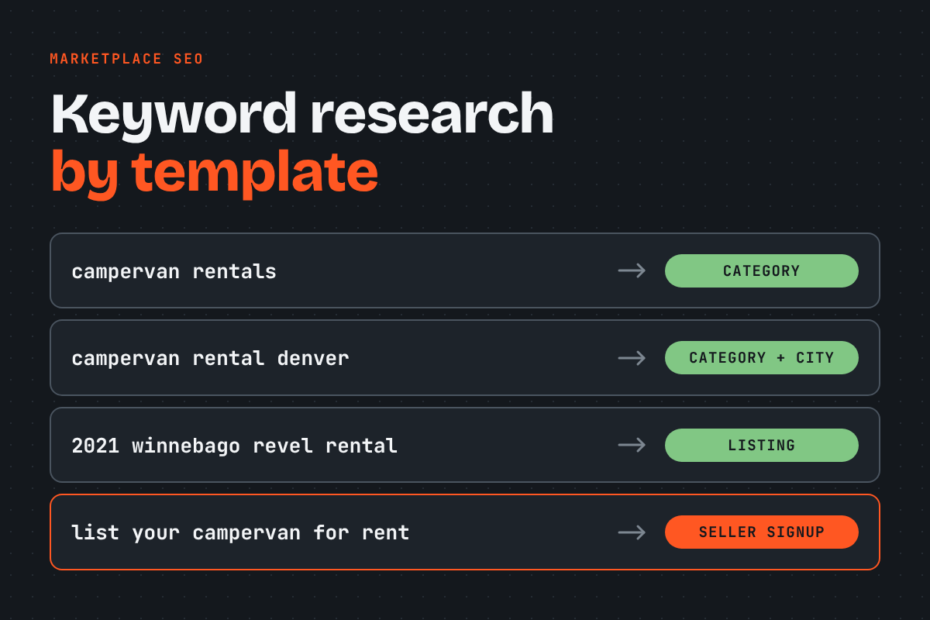
| Category page | Primary broad inventory terms | campervan rentals | Buyers | 500 to 10,000 |
| Category plus location page | Category with geographic modifiers | campervan rental denver | Buyers | 50 to 2,000 |
| Listing page | Long-tail item, brand, or model terms | 2021 winnebago revel rental | Buyers | 10 to 200 |
| Seller signup page | Commercial supply-side acquisition terms | list your campervan for rent | Sellers | 50 to 1,000 |
Mapping every query type to a defined template prevents overlapping URLs from competing against each other in search results.
Apply the inventory threshold from Step 1 before generating new pages. If inventory drops to zero, serve proper status codes rather than leaving an empty page open to search bots. Keep every listing within three clicks of the homepage so search bots discover your inventory without running into crawl depth roadblocks.
To scale metadata across thousands of URLs, build programmatic title tag formulas based on your keyword research:
- Category page title pattern:
[Category Name] Rentals & Hire | [Brand Name] - Location page title pattern:
[Category Name] in [City, State] | [Brand Name] - Listing page title pattern:
[Year] [Make] [Model] Rental in [City] | [Brand Name]
Tip: Amazon caps listing titles at 200 characters, while Etsy enforces a strict limit of 140 characters. For your own marketplace web pages, keep title tags under 60 characters so Google does not truncate your headings in search results.
Step 8: Track rankings by template in Search Console
Once your mapped pages go live, measure their performance using Google Search Console. Filter the Performance queries report by page URL patterns to isolate templates from one another.
To review regional landing pages, filter the page URL by /locations/. To evaluate category pages, filter by /category/. Comparing these URL buckets reveals whether a ranking issue stems from a site-wide indexation bug or a weak keyword pattern on a single template type.
Watch for queries generating high impressions but low click-through rates. This gap indicates that the page targets the right search term, but the title tag fails to address the user’s explicit intent. Similarly, if Search Console shows listing URLs ranking for broad category terms, your internal linking hierarchy is diluting category authority.
Review and refresh your keyword maps quarterly. As inventory expands and new search phrases emerge in site search logs, add newly qualified clusters to your programmatic routing rules.
Frequently asked questions about marketplace keyword research
Can you use ChatGPT for marketplace keyword research?
You can use ChatGPT to brainstorm seed keywords, suggest synonym variations, and group recurring modifier patterns. However, language models lack live search volume, search intent distribution, and keyword difficulty data. Run every generated suggestion through an established keyword research tool and Google Search Console to verify real user demand before creating site categories.
How many keywords should a marketplace page target?
Each marketplace page should target one primary keyword cluster alongside its close grammatical variants. The total number of target keywords across your marketplace follows your inventory volume and template structure rather than a fixed number. A marketplace with 50 categories, 100 cities, and 5,000 live listings naturally targets thousands of unique search terms across its hierarchy.
How long does marketplace SEO take to show results?
A new marketplace category page generally gets indexed within a week when supported by clear internal links and an accurate XML sitemap. A completely new domain typically requires more than three months to generate meaningful organic traffic from Google. To speed up discovery, keep all pages within three clicks of the homepage, submit dedicated XML sitemaps capped at 50,000 URLs per file, and track initial impression growth in Google Search Console.
Is this different from Etsy or Amazon listing keyword research?
Etsy and Amazon sellers optimize single listing titles and product tags for internal marketplace algorithms using seller software such as Helium 10 or eRank. A marketplace operator optimizes an entire multi-template platform for Google’s search algorithms. That means deciding indexation policies across thousands of programmatic pages, managing crawl budget, and preventing duplicate facet combinations.
Build your first marketplace keyword map
Start your keyword mapping with the single category that contains the highest number of active listings on your platform. Selecting your deepest inventory pool guarantees that every generated category, subcategory, and regional URL meets minimum content requirements and satisfies incoming searchers immediately.
Export that category’s listing data, extract its common attributes, and pull search volume for those modifiers using Google Keyword Planner. Organize those terms into a clean spreadsheet with dedicated columns for search query, target URL template, audience type, and monthly search volume. Once your spreadsheet maps each cluster to one specific URL pattern, update your CMS template rules to apply those title and heading formulas across the entire catalog.
If you want an objective review of your indexation setup and page hierarchy, I provide a free SEO audit that reveals what is holding your content back. For a complete overhaul of your crawl budget, facet indexation, and template architecture, we also offer a hands-on technical teardown.