
Deciding a marketplace’s indexation policy comes down to deciding per page template, not per URL, and writing each decision down as three things: whether the template may be indexed, which directive enforces it, and whether its URLs belong in the sitemap.
A marketplace category page should be indexed when people search for it and enough live listings exist to satisfy them.
Key Takeaways
- Index a category only when it has measurable search demand and enough live listings, with the threshold set per vertical.
- Noindex controls indexing, canonical only suggests a preferred URL, and
robots.txtblocks crawling, so each URL type gets exactly one of the three. - A URL blocked in
robots.txtcan never pass a noindex instruction because Google cannot fetch the page to read it. - Indexable filter pages need a static URL, their own H1 and title, and confirmed demand.
- Sitemaps should list only canonical, indexable categories, while internal links carry more weight for discovery.
- Filter the Page indexing report by your category sitemap to see whether the policy is working.
How should marketplace category page indexation for SEO work?
Marketplaces need the written rule more than single-brand stores, because sellers and filters create category URLs faster than anyone reviews them.
An indexation policy for marketplace categories is a written rule that decides, for each URL type, whether Google may index it. The rule covers categories, filtered views, sort orders, seller pages and location combinations. Templates enforce it, so nobody has to review individual pages.
A store with 200 products has a few dozen categories you can audit by hand, but a marketplace that crosses categories with locations, brands and price bands produces thousands of URLs overnight. A decision made per template is the only kind that scales.
What decides what pages should remain indexable?
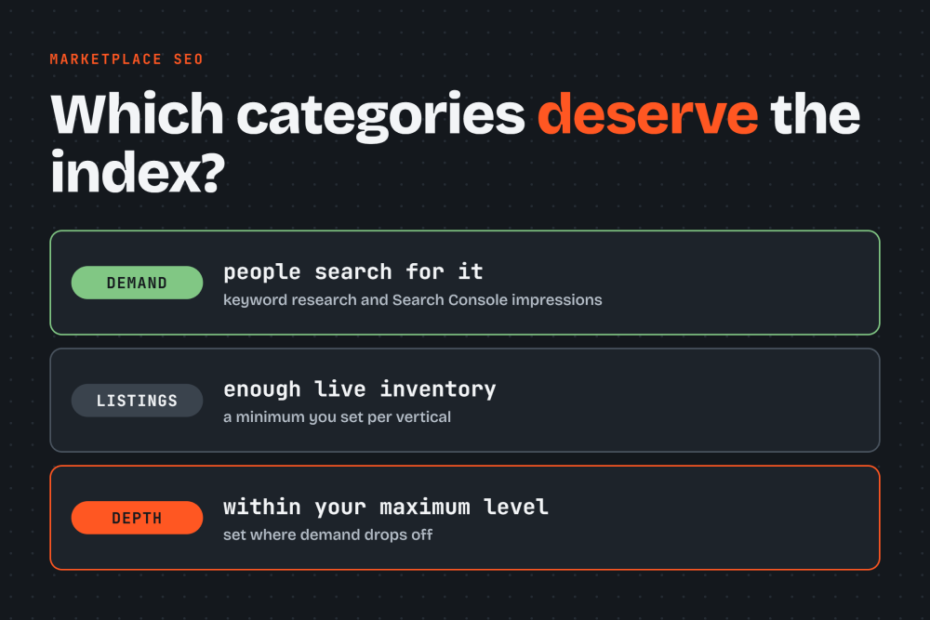
Search demand, listing count and category depth decide which categories qualify.
- Check search demand first by running keyword research on the category name and its modifiers (brand, location, condition), then check impressions in Search Console for the same URL or for queries it should match. A category with no searches in either source has no reason to be indexed, however full it is.
- The number of listings on a category, is the second factor. Set a minimum number of live listings per category as a policy choice your team makes per vertical, because 2 listings could be a healthy used-bike category and a thin one in a high-volume electronics vertical. Write the number into the rule, then revisit it after reading the Page indexing report.
- Category depth is the third factor, and probably the most important one. Each level down the hierarchy narrows the audience, so a deeper category must prove its own demand and inventory before it earns an index. Set a maximum indexable level per vertical, at the point where search demand drops off, and noindex or consolidate everything below it. The section on category depth below explains how to find that level.
How to handle categories with few listings?
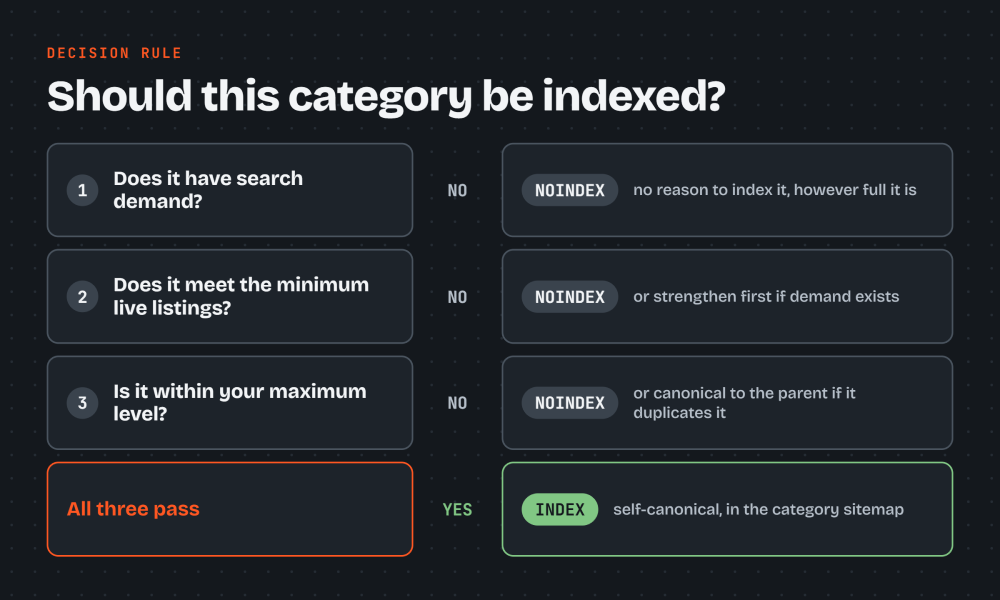
Categories with few listings should be noindexed when they also lack demand. When demand exists but inventory is borderline, strengthen the page before deciding. Give it a clear H1, two or three sentences of intro copy describing what buyers find there, and links to subcategories or sibling categories. A page that gives Google something distinct to evaluate is more likely to be kept.
Thin pages do hurt a marketplace, and the damage spreads throughout the entire site. Large numbers of near-empty or even empty URLs consume crawl budget on pages that will never be indexed, and they dilute the share of your site that Google judges worth keeping.
How deep should category pages be indexed?
Index category levels down to the point where each level still has its own search demand and enough live listings. Below that point, noindex the level or consolidate it into its parent.
Depth means two different things. URL depth is the number of path segments, and click depth is the number of clicks from the homepage. John Mueller of Google has said that click depth matters and that the number of slashes in a URL does not. Flattening /bikes/electric/mountain/ into /mountain-ebikes/ therefore changes nothing for Google, while linking the category from a page the homepage already links to does.
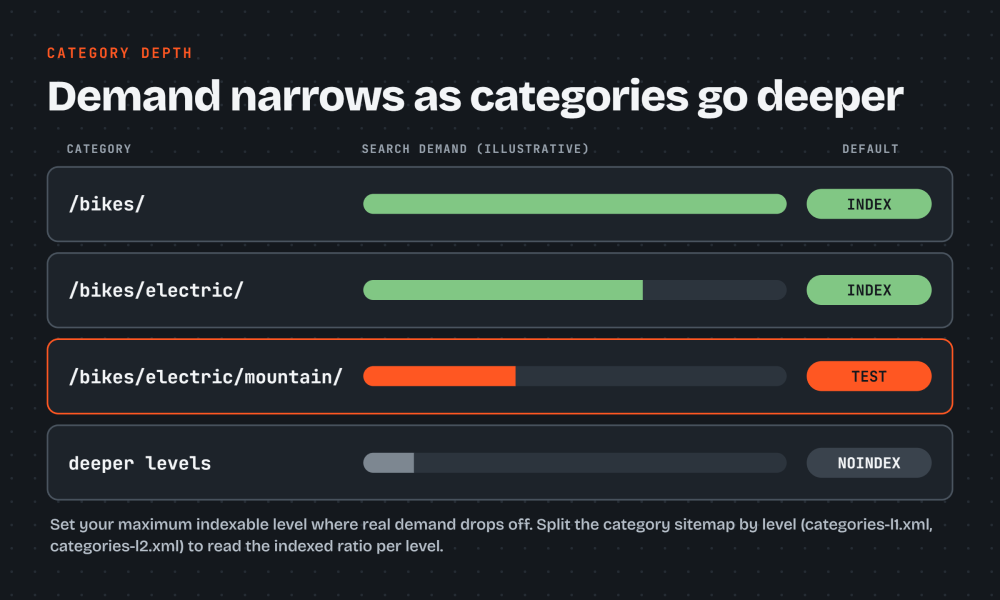
| Level | Example | Default | Condition |
|---|---|---|---|
| Top category | /bikes/ |
Index | Almost always has demand |
| Subcategory | /bikes/electric/ |
Index | Demand and listing tests pass |
| Third level | /bikes/electric/mountain/ |
Test | Index only if both tests pass, otherwise noindex |
| Beyond your set maximum | Deeper levels | Noindex | Canonical to parent if it duplicates it |
How to set the maximum indexable level?
Check queries and impressions for a sample of categories at each level, and mark the level where demand drops off. The deeper you go, the lower the search demand. Write that level into the policy as a number per vertical, the same way you write the minimum listing count. Revisit it after reading the Page indexing report.
Split the category sitemap by level, for example categories-l1.xml and categories-l2.xml. The Page indexing report then shows the indexed ratio for each level, and a sharp drop at one level marks your cutoff candidate.
Avoid noindexing a middle level that sits above indexed children. A long-term noindex can cost Google the crawl path to the pages below it, so confirm those children have another route.
Give every category one canonical parent path. A category reachable under several parents keeps a single URL, a single breadcrumb trail and a single place in the hierarchy, and the other paths link to that one.
Show the hierarchy with breadcrumbs built from plain <a href> links, so every deep category links back up the tree and no level depends on JavaScript to be found.
What causes the multiplication of URL pages?
Filter combinations (color, price, condition stacked together), sort parameters (?sort=price_asc), seller or vendor parameters, and location crossed with category generate the most extra category URLs. Each multiplies the others, so three filters with ten values each produce a thousand variants of one category before location is added.
Google’s documentation says it becomes a concern for sites with over one million unique pages whose content changes weekly, or over 10,000 pages that change daily. Marketplaces with millions of listing URLs sit well inside that range.
Blocking with robots.txt is the right tool for URL patterns that have no search value as indexable pages. Sort parameters, internal search results and unbounded filter combinations fit. A pattern like Disallow: /*?sort= stops Google from spending requests there.
Before blocking an endpoint, keep a mapping of what it feeds in the interface, because a disallow on a path that renders listing content can empty your pages in Google’s rendered view.
Noindex, canonical and robots.txt for category URLs
Noindex controls indexing, and Google obeys it once it reads the tag. A canonical only suggests a preferred URL, and Google may choose differently. More often than not Google just ignores it, so harder rules may be necessary.
robots.txt controls crawling and says nothing about indexing, so a blocked URL can still appear in results as a bare link without a description.
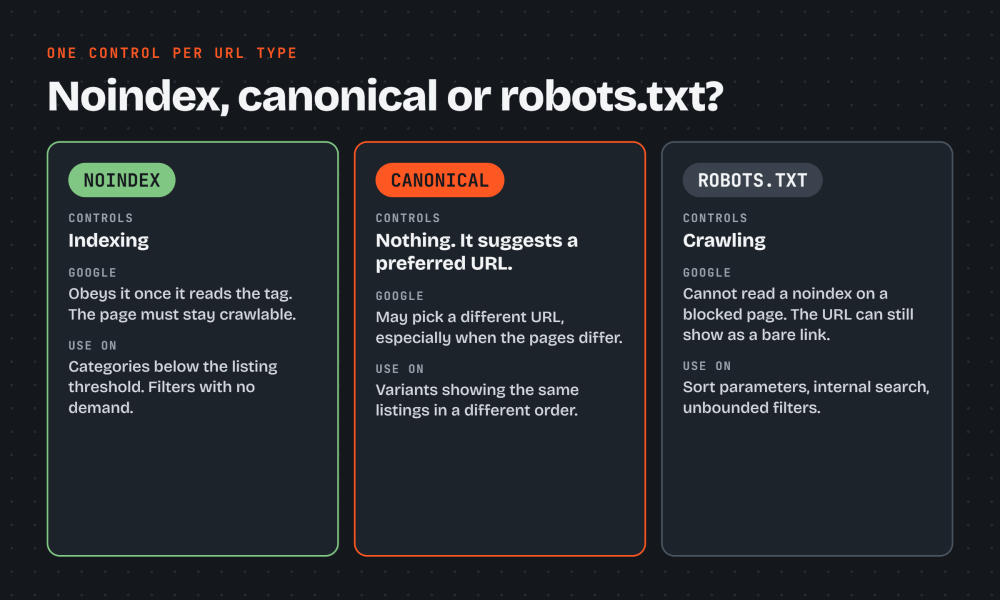
To stop Google from indexing a category page, add <meta name="robots" content="noindex"> or an X-Robots-Tag: noindex header, and leave the page crawlable. One rule covers each URL type:
| URL type | Control | Reason |
|---|---|---|
| Category with demand and listings | Index, self-canonical | Meets both tests |
| Empty or below-threshold category | Noindex | Fails inventory test |
| Sort-order variant | robots.txt disallow |
Crawl waste, no search value |
| Filter variant, same listings reordered | Canonical to parent | Duplicate of a stronger page |
| Filter combination with proven demand | Index, self-canonical | Own intent, own page |
| Filter combination, no demand | Noindex | Thin and unsearched |
| Internal search results | robots.txt disallow |
Unbounded URL space |
Noindex for empty and thin categories
Noindex is right when the category is its own page but fails the demand or inventory test. Google treats a long-term noindex as a signal to eventually stop crawling the page and following its links. Listings reachable only through that category can therefore lose their crawl path, so check that those listings have another route.
When Search Console shows “Excluded by noindex tag” for a category you want indexed, find where the tag originates. Look in the page template, the CMS setting and the HTTP header, because a server rule can add an X-Robots-Tag that never appears in the HTML. Remove it, confirm in URL Inspection that the live page is indexable, then click Validate Fix.
Canonical tags for filter and sort variants
Point a canonical at the parent category when a variant shows the same listings in a different order or a slightly narrower set. Google then consolidates signals onto the parent.
Canonicals on filter pages whose listings differ substantially from the parent’s are often ignored. Google compares the content, sees a distinct page, and indexes whichever version it prefers. If the variant deserves to exist, make it indexable on purpose. If it does not, use noindex.
Filter pages
A filtered category page can be indexed without duplicate-content problems when it has a static, clean URL (/used-bikes/electric/ rather than ?type=electric&sort=new), its own H1 and title, and confirmed search demand. A filter page lacking any of the three stays noindexed or canonicalized.
imit indexable facet stacking to the point where the duplicate count grows faster than the demand. One filter level usually carries distinct search intent, as in “electric bikes” within bikes. Beyond a set number of stacked facets, apply noindex by rule, and consolidate facets that fragment one intent, such as price and year bands for the same category.
Paginations
Pagination needs a deliberate state for every page. Although Google officially recommends that each page from 2 onward should carry a self-referencing canonical, I’ve always had canonical tags of paginated pages point to the root page. Links between pages must be plain crawlable <a href> elements, since Google no longer uses rel="next" and rel="prev". This could cause paginations to appear in the index and cause unnecessary bloat, and on a large marketplace this does more harm than good.
Adding nofollow to pagination links to discourage indexing can also be another way of controlling indexation.
XML sitemaps
The category sitemap should only canonical, indexable categories, each with an accurate lastmod. Redirects, noindex pages, URLs canonicalized elsewhere and soft 404s stay out, because a sitemap that contradicts your tags teaches Google to distrust it. Rebuild it whenever the policy changes.
Each sitemap file holds up to 50,000 URLs or 50MB uncompressed. List the files in one sitemap index and submit that file in the Sitemaps report. Name the children by template and number, such as categories-001.xml. Search Console filters by each child separately, so you can sum them.
A sitemap tells Google a URL exists and which version you prefer. Internal links tell Google the page matters, which is why links carry more weight. A category present in the sitemap but orphaned from navigation often lands in “Discovered, currently not indexed”.
Internal links to category pages
Link to categories rather than inventory, because items expire and categories do not. The homepage should link to the categories with the most strategic value, chosen through keyword research. Guides and reviews should link to relevant categories. Cards and related-listing modules need varied, natural anchor text because they repeat on every page of a template. Keep each listing within three clicks of the homepage through categories and hubs, and never link individual listings from the homepage.
Remove internal links to noindexed or canonicalized variants. Pages kept out of the index still consume crawl while links point to them, and links to non-canonical versions spread the signals you want on the parent.
Category indexation status in Google Search Console
Open the Page indexing report and filter it by your category sitemap. The result shows how many submitted categories are indexed and the top reasons for the rest. Then paste individual URLs into the URL Inspection tool to see Google’s canonical choice and the last crawl date. Because you only submit URLs meant to be indexed, a category template at 60% indexed is a problem worth investigating.
“Crawled, currently not indexed” and “Discovered, currently not indexed” point to different causes. The first says Google fetched the page and judged it not worth keeping, while the second says Google knows the URL and has not fetched it yet.
Crawled, currently not indexed category pages
For a category, the status usually means thin listings or near-duplicate filters. Inspect at least five example URLs per reason before changing anything, and check whether they pass your own demand and inventory tests. When a page fails those tests, noindex it and accept the status as the policy working. When it passes, add intro copy, subcategory links and distinct listings, then request indexing.
Discovered, currently not indexed category pages
A category stuck in this status usually has weak internal links, and the site is often spending its crawl on other URLs. Google has the URL, probably from a sitemap, but has not made fetching it a priority. To fix it, first cut the crawl waste by disallowing sort parameters and unbounded filter patterns. Then add internal links to the category from pages that Google already crawls often. Fixing the waste usually matters more than resubmitting, because resubmitting does nothing about why Google is not fetching the page.
Frequently asked questions about marketplace category indexation
How many category pages should a marketplace have indexed?
No fixed count applies, because the right number is however many categories pass the demand and inventory tests. Compare the indexed count in Search Console with the count your policy marks as indexable. A wide gap in either direction means a rule or a template is misbehaving.
How long does it take Google to index new category pages?
Timing varies and Google does not guarantee any window. Sitemap inclusion, internal links from pages Google already crawls often, and a URL Inspection request for priority pages all tend to speed it up. Check progress in URL Inspection rather than waiting blind.
Should a temporarily empty category stay indexed?
If the category has search demand, keep it indexed. Toggling noindex on and off as stock fluctuates makes Google re-evaluate the page repeatedly and can cost a category that has built rankings. Show related listings or subcategory links so the page still serves a visitor. Categories with no demand and no prospect of stock should be noindexed or removed.
Writing and automating your category indexation policy
Document the policy as one rule per URL type, copying the table from the control section and adding the thresholds your team chose: minimum live listings, maximum stacked facets, maximum indexable category depth, and the demand source. A policy that lives in a wiki nobody reads drifts, but a policy written into templates does not.
Automate the noindex rule. Have the category template add noindex when live listings fall below the threshold and remove it when they recover. To avoid flapping, use a lower bound for adding noindex than the bound for removing it, and keep the sitemap generated from the same rule, so the two cannot disagree. New URL patterns should pass the policy before they ship.
Re-check indexation against the policy monthly in Search Console, comparing submitted and indexed counts per sitemap file and reading the top exclusion reasons.
To check your own category templates against this policy, request a category indexation audit at lumkamishi.com.