
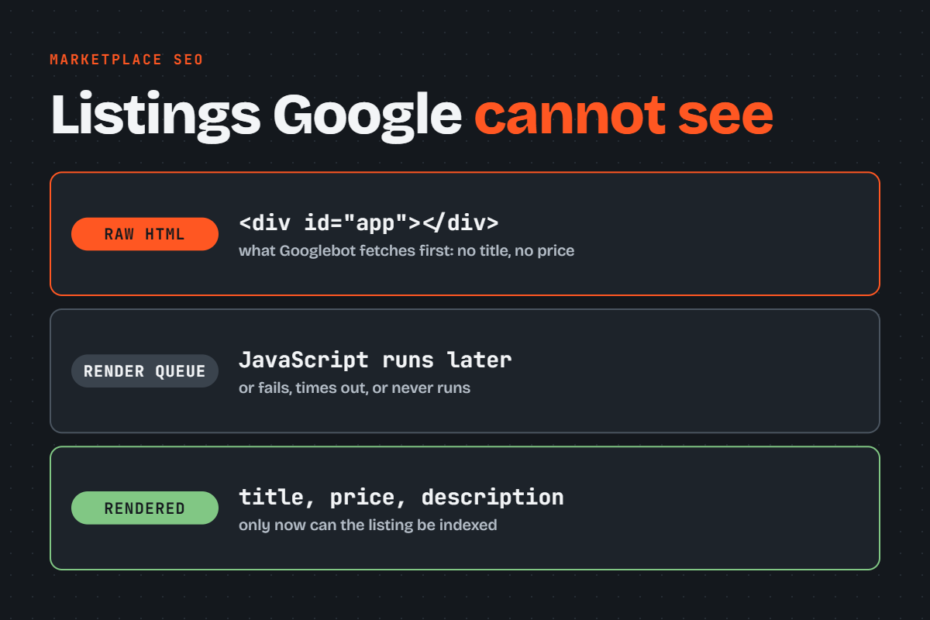
You push a new frontend release for your marketplace, watch Googlebot crawl your URLs in the server logs, and wait for new product listings to appear in Google Search. Instead, thousands of valid listings sit excluded in Google Search Console while traffic stalls.
Re-submitting your XML sitemaps does not fix this problem because Googlebot cannot index listing content it cannot parse during its initial crawl pass. Google leaves JavaScript-rendered marketplace listings unindexed when critical listing data or discovery links depend on client-side execution, when rendering queues defer execution, or when crawl directives block the required resources.
Key Takeaways
- Google processes pages in two waves: it crawls the raw HTML first and queues JavaScript execution for later, which delays or prevents listing indexing.
- Client-side API calls and infinite scroll patterns hide product titles, prices, descriptions, and item links from Googlebot.
- A
noindexdirective present in the initial server response stops Google from ever rendering the page, even if JavaScript removes the tag later. - Blocking JavaScript bundles or internal catalog APIs in
robots.txtbreaks DOM generation and causes indexing failures. - Server-side rendering guarantees that Googlebot receives critical listing data and discovery links immediately on the first HTTP request.
Why are marketplace listings not indexed with JavaScript rendering?
Google fails to index JavaScript marketplace listings because client-side architectures separate the initial HTTP request from the actual rendering of the page content. When a listing page relies entirely on client-side JavaScript, Googlebot receives an empty HTML shell during its first visit. Google must then push that URL to a secondary rendering queue before its Web Rendering Service (WRS) can build the complete Document Object Model (DOM).
This delay creates severe blind spots for marketplace catalogs. If your listing titles, product descriptions, stock availability, or internal links exist only after client-side scripts run, Google evaluates an empty page during its initial pass. If those scripts fail, time out, or hit blocked API endpoints during the render stage, the listing never gets indexed.
Google Search Console highlights these failures under two main coverage statuses:
- Discovered – currently not indexed: Google knows the listing URL exists, usually from an XML sitemap or an internal link, but has not crawled the page yet. On JavaScript marketplaces, this status points to crawl budget exhaustion, low domain authority, or deep site architecture where listings sit too far from category hubs.
- Crawled – currently not indexed: Google fetched the listing URL, read the initial server response, and chose not to index it. This status indicates thin or duplicate content in the raw HTML, failed client-side rendering, or listing content that arrived too late for the crawler to capture.
Google can render JavaScript listings, so this problem is entirely fixable. Googlebot uses an evergreen Chromium browser engine to execute modern JavaScript and process dynamic code. The issue is not whether Google can run JavaScript, but whether client-side execution survives every point of failure across crawl queues, network requests, and asset discovery.
How Googlebot renders JavaScript listing pages
Google processes every listing URL through a two-stage indexing pipeline. In the first stage, Googlebot fetches the URL, parses the raw server-rendered HTML, extracts any traditional hyperlinks found in the markup, and indexes the raw content immediately. In the second stage, Google places the URL into a queue for the Web Rendering Service, which later executes the page scripts in a headless Chromium environment and renders the final DOM for indexing.
This split pipeline determines which parts of your listing Google can use at each stage. Text and links present in the initial server response become searchable right away. Any listing content loaded after page load through a client-side API call remains invisible until the rendering queue processes the page.
Google can index content loaded via client-side API calls, but only under strict conditions:
- The API endpoint must respond quickly without exceeding Googlebot’s execution timeout thresholds.
- The API endpoint must return a successful HTTP 200 status code without requiring user cookies, local storage, or session tokens.
- The API request must not be blocked by directives in your
robots.txtfile. - Googlebot must not run out of host resources or render capacity before executing the network call.
Marketplace scale makes this processing delay dangerous. Google documents that crawl budget becomes an active operational constraint on websites with over one million unique pages that change weekly, or over 10,000 pages that update daily.
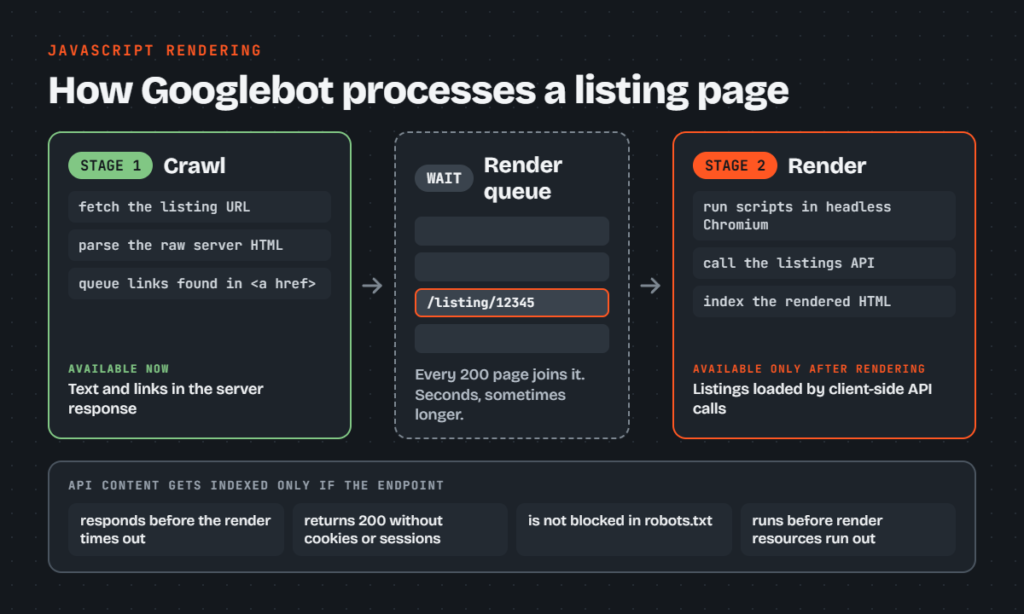
When a marketplace generates thousands of new, modified, or expired listings every day, queuing every single URL for heavy headless browser rendering creates a massive backlog. Googlebot spends its allocated crawl resources waiting on JavaScript rendering passes instead of discovering and updating your inventory.
Rendering patterns that hide listing content
That rendering backlog hurts most when the interface itself keeps inventory out of the raw HTML. Modern single-page applications and client-side web frameworks often use interface patterns that inadvertently conceal catalog inventory from web crawlers.
Listing data fetched from an API after load
When a user visits a client-side rendered marketplace, the browser downloads a minimal HTML bundle, executes framework scripts, calls an external JSON endpoint, and paints the listing title, price, and attributes into the DOM. This pattern frequently breaks in search environments. If the catalog API responds slowly, Googlebot terminates script execution before the data populates the container elements.
In frameworks like React, Vue, or client-side Next.js configurations, this pattern shows up as empty shell components. The raw HTML response contains placeholder <div> tags or loading spinners while the actual product details wait on an asynchronous fetch() or axios call. When Google’s rendering service experiences high load or the API request fails silently, the crawler indexes a page that contains zero product text, resulting in a thin-content rejection.
Listing links behind infinite scroll
Marketplace category pages frequently use infinite scroll or dynamic “Load More” buttons to present inventory to shoppers. These components fetch additional batches of products through client-side events triggered when a user scrolls down the viewport or clicks a button.
Googlebot does not mimic user behavior. It does not scroll down your category pages, drag scrollbars, or trigger artificial click events to reveal more cards. As a result, every listing link that appears exclusively on page two and beyond remains completely hidden from Google’s link extraction parser.
To keep your catalog discoverable, replace scroll-dependent inventory with crawlable pagination components. Use standard HTML anchor tags (<a href="/category?page=2">) pointing to dedicated paginated URLs. Ensure your site architecture keeps every listing within three clicks of the homepage through categories and subcategories, and publish all live inventory inside clean XML sitemaps.
Directives that stop listing pages being rendered
Even when your content and links are crawlable, technical directives inside your server headers, HTML templates, or crawl rules can prevent Google from reaching the rendering stage entirely.
A noindex tag in the raw HTML
Some developers configure listing templates to ship a default <meta name="robots" content="noindex"> tag in the initial server response, planning to use client-side JavaScript to inspect the listing state and remove the tag if the product is active.
This approach fails completely. Google Search Central documentation confirms that if Googlebot encounters a noindex directive in the raw HTML response, it skips the JavaScript rendering stage altogether. Because the engine drops the page before reaching the Web Rendering Service, your client-side script never runs, and the noindex tag is never removed.
For out-of-stock, sold, or expired marketplace listings, manage indexation directly at the HTTP header level or in the server-side markup. If a listing is permanently gone, return an HTTP 404 or 410 status code. If a listing has a direct replacement, issue a single-hop 301 redirect to that specific category or equivalent product rather than manipulating robots tags in client-side code.
robots.txt rules blocking scripts or APIs
Marketplace infrastructure teams often block internal endpoints in robots.txt to shield application databases from crawler traffic. They apply rules such as Disallow: /api/ or Disallow: /static/bundles/ to cut down on extraneous server hits.
A robots.txt disallow does not remove a page from the index, but blocking script or data assets prevents Google from rendering pages that depend on them. When Googlebot cannot fetch your client bundles or your listing data APIs, Chromium renders a broken, blank page. The Web Rendering Service records failed network dependencies, flags the listing as empty, and drops it from search results.
Keep all application scripts, stylesheets, and listing catalog API endpoints accessible in your robots.txt file. If you must restrict crawler access to specific parameter configurations, target the query strings directly:
Disallow: /*?sort=
This rule prevents Googlebot from crawling duplicate sorting variations while leaving your essential data endpoints and JavaScript assets open for page rendering.
How to check what Googlebot sees on a listing
To find out which of these problems affects your catalog, diagnose indexation drops by testing individual listing URLs and verifying template-level consistency across your entire catalog.
Rendered HTML in the URL Inspection tool
Open Google Search Console and paste a problematic listing URL into the URL Inspection tool. Click the Test Live URL button to force Googlebot to fetch and render the page in real time.
Once the live test completes, click View Tested Page to open the inspection panel. Review the following tabs:
- HTML: Check the rendered markup for your core listing data. Verify that your listing title, price, seller name, product description, and structured data blocks appear in the rendered code.
- Screenshot: Confirm that the visual snapshot displays the actual listing rather than a blank white canvas, a spinning loading indicator, or a client-side error screen.
- More Info: Review the Page resources section to identify any JavaScript bundles, fonts, or catalog API endpoints that Googlebot could not load due to
robots.txtblocks or network timeouts. Inspect the JavaScript console messages for unhandled exceptions that crashed your framework before the page finished rendering.
Tip: If your live inspection screenshot shows a blank area where the listing details belong, check the Console Messages list for missing polyfills or unhandled promises that halted component mounting.
Raw versus rendered HTML across many listings
Testing one URL at a time will not expose systematic rendering failures across large marketplace databases. Run a site crawl using a desktop crawler like Screaming Frog SEO Spider configured in JavaScript Rendering mode.
Configure the crawler to capture both the raw server response and the post-render DOM. Run the crawl across a representative sample of at least five example URLs per listing category.
Compare the two HTML output versions using custom extraction rules or automated filters. Flag any listing URLs where:
- The raw HTML contains zero words in the listing description container.
- The item price and availability exist only in the rendered DOM.
- Internal product links inside category grids drop to zero when JavaScript execution is turned off.
Identifying these discrepancies tells your engineering team exactly which templates rely on client-side dependencies for core search signals.
Rendering options for marketplace listing pages compared
Once your diagnostics point to client-side dependencies, the lasting fix is architectural: to ensure Google indexes your listings reliably, your application must deliver core content on the initial HTTP fetch.
The comparison below outlines how common rendering architectures supply catalog content to search engine crawlers:
| Rendering approach | What Googlebot gets on first fetch | Freshness for changing listings | Server and build cost | Best for |
|---|---|---|---|---|
| Client-side rendering (CSR) | Empty HTML shell and script tags | Low: delays render queue | Lowest server load | Private user dashboards |
| Server-side rendering (SSR) | Complete HTML with data and links | High: renders live on request | High server compute cost | High-inventory, fast-moving listings |
| Static site generation with incremental regeneration (SSG/ISR) | Complete pre-rendered HTML document | Moderate: background regeneration delay | Low server load, high build caching | Stable catalogs with infrequent edits |
| Dynamic rendering or prerendering service | Pre-rendered HTML for search bots | Moderate: cache dependent | Additional proxy maintenance | Temporary migration bridge only |
Client-side rendering is poorly suited for public marketplace listings because it forces search engines to expend rendering resources simply to read basic item specifications. Server-side rendering solves this issue by compiling listing data, meta tags, and internal links directly on your application server before returning the response. In frameworks like Next.js, using getServerSideProps guarantees that Googlebot receives fully populated HTML on its initial crawl pass.
Static site generation with incremental static regeneration can work well for smaller, stable catalogs. However, marketplaces with volatile inventories, changing prices, and continuous expiration cycles risk serving stale cache responses to crawlers.
Dynamic rendering, which uses a headless browser service like Rendertron or Prerender.io to serve static snapshots exclusively to search bots, was previously treated as an acceptable stopgap. Google’s current documentation states clearly that dynamic rendering is no longer a recommended long-term solution. It introduces brittle proxy routing, cache synchronization errors, and distinct rendering pathways that are difficult to debug. Focus development resources on standard server-side rendering instead.
Frequently asked questions about unindexed marketplace listings
What is the difference between crawled and discovered but not indexed?
“Discovered – currently not indexed” means Google found your listing URL through an internal link or sitemap but has not fetched the page yet. On marketplaces, this indicates crawl budget constraints, low internal link equity, or deep page nesting. “Crawled – currently not indexed” means Google fetched the URL but chose not to add it to the index, typically due to duplicate descriptions, thin content, or failed JavaScript execution.
How long does Google take to index listings after a rendering fix?
Indexation recovery requires Google to recrawl the affected URLs, run them through its processing pipeline, and refresh its index records. For small sites, this can take a few days. For marketplaces with hundreds of thousands of listings, updates happen unevenly over several weeks as Google distributes crawl capacity across your sitemaps.
Does requesting indexing help for thousands of listings?
The URL Inspection tool’s “Request Indexing” feature is built strictly for individual debugging and spot checks. It carries strict daily submission quotas and cannot process bulk inventory.
For large marketplaces, the only scalable path is publishing structured XML sitemaps capped at 50,000 URLs and 50MB per file, updating accurate <lastmod> timestamps, and strengthening your internal category linking paths. The Google Indexing API does not support standard marketplace listings; Google documents that it is restricted exclusively to JobPosting and BroadcastEvent structured data.
Is lazy loading bad for SEO on listing pages?
Lazy loading is safe for product images when implemented using native browser loading via <img loading="lazy"> or standard IntersectionObserver scripts. However, lazy loading breaks search indexing when applied to listing copy, technical attributes, or category grid links that require physical viewport scrolling to mount into the DOM. Keep all text content and navigation anchors directly in the server-rendered markup.
What to fix first when listings drop out
When thousands of marketplace listings drop out of Google’s index, work through this sequence to isolate and resolve the underlying technical failure:
- Audit crawl directives and robots rules: Inspect your
robots.txtfile to ensure no application scripts, bundle chunks, or catalog API routes are disallowed. Confirm that your listing templates do not output a<meta name="robots" content="noindex">tag in the initial server response. - Inspect live listing templates: Paste five active listing URLs from different catalog categories into the Search Console URL Inspection tool. Check the rendered HTML, inspect the screenshot for missing content, and review the console log for failed API requests or unhandled script exceptions.
- Move critical listing content to raw HTML: Refactor your frontend templates to server-side render the listing title, price, description, breadcrumbs, structured data, and related item links. Googlebot must be able to read these elements in the initial HTTP 200 response without executing client scripts.
- Fix discovery paths and category pagination: Replace infinite scroll triggers on category and search result pages with standard HTML pagination links. Ensure every live listing is reachable within three clicks of the homepage through logical category hierarchies.
- Rebuild and resubmit XML sitemaps: Segment your inventory into sitemap files containing no more than 50,000 URLs each. Include only canonical, live listings that return an HTTP 200 status code, and submit the sitemap index to Search Console.
- Monitor the Page indexing report: Review the Search Console Page indexing report weekly to verify that excluded URLs transition out of “Crawled – currently not indexed” and into the valid indexed pool.
If your marketplace continues to lose indexed pages after updating your frontend code, you need a precise diagnostic across your templates. Claim a free audit at lumkamishi.com to identify exactly what is holding your content back, or book a full teardown to eliminate technical rendering issues across your catalog.