
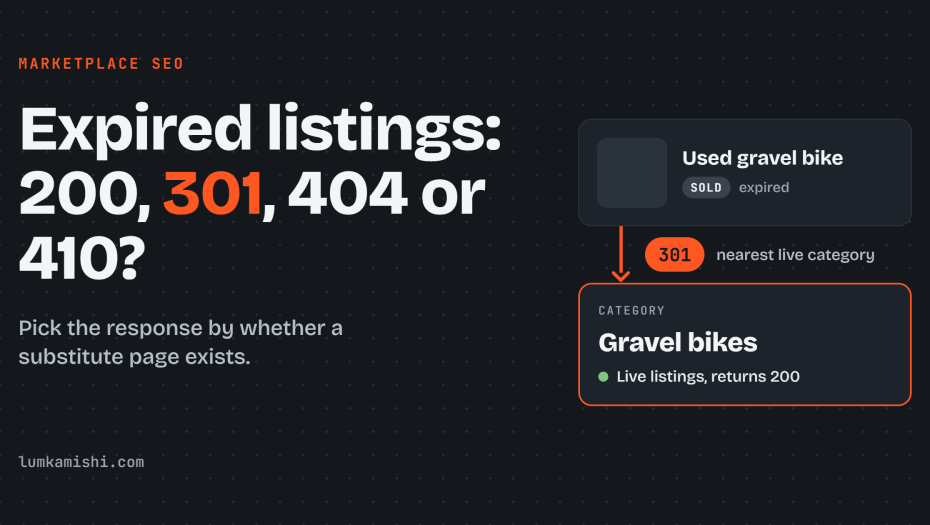
When a listing expires, you only have to answer one question: is there another page a visitor would be happy to land on? If there is, 301 to it. If there isn’t, return a 404 or 410. If the listing is coming back, leave it live as a 200. Google treats 404 and 410 the same, so picking between them is housekeeping, not a ranking decision.
This post expands Step 7 of my marketplace SEO guide into a full rule set.
Status Codes
The rule is one question: does a page exist that a visitor looking for this listing would accept instead? If yes, redirect to it. If no, return an error. If the listing will return, keep it live.
| Listing situation | Response | Why |
|---|---|---|
| Recurring item that comes back (a rental unit, a seller’s standing service) | 200, with an unavailable state on the page | The URL keeps its history and is ready when supply returns |
| One-off item with a close parent page (a sold used bike, with its category and location page) | 301 to that parent | A 301 is a strong signal that Google should process the target |
| One-off item with no close substitute | 404 or 410 | Indexed URLs returning 4xx are dropped from the index |
| Time-bound listing with a known end (event, job, auction) | 200 until the end, then 404, 410 or a 301 | The end date is known, so the response can be scheduled |
| Temporarily out-of-stock product | 200, with availability markup updated | The product returns, so the page should stay indexable |
What Google does with each code?
301
Google’s documentation says its systems use a redirect “as a strong signal that the redirect target should be processed.” A 302 is only a weak signal. Crawlers follow up to 10 redirect hops, so a chain still resolves, but every hop is a place to lose the signal. Use one hop to the final target.
404 and 410
Google handles all 4xx errors except 429 the same way. It does not use the content of a URL that returns 4xx, and an already indexed URL that returns 4xx is removed from the index. Newly discovered 404 URLs are not processed, and crawling of a 404 URL slows down gradually. Google’s help page states that it “treats 410s (Gone) the same as 404s (Not found).” A 410 therefore buys nothing in Google. Pick one code and apply it consistently. The practical gain of a dedicated 410 rule is in your own logs, where deliberate removals stay separate from accidental 404s.
200 on a dead page
A page that returns 200 but reads as an error or shows no content is reported in Search Console as a soft 404. Google describes soft 404s as confusing to both users and search engines. A “this listing has expired” message with no other content on a 200 page is the typical cause.
Why you shouldn’t redirect every expired listing to the homepage?
Redirecting every expired listing to the homepage makes it harder for Google to understand your site’s structure. The same page counts redirecting users instead of returning a 404 as a soft 404.
In practice, a redirect carries value only when the target answers the same need as the source. A sold used bike redirected to the homepage answers nothing, so Google has no reason to carry the old URL’s value across. The visitor also lands on a page that does not match what they clicked. A redirect to a category and location page that still lists comparable bikes does answer the need, and that is the case the 301 is for.
There are two questions you should ask when deciding:
- Would a visitor who arrived from a search for the old listing find the target useful?
- Does the target page itself return a 200 and carry live listings?
How to redirect expired listings?
Send every expired listing to the closest category that still has live listings. The rule is simple. Finding that category is the work, and there are two ways to do it.
- Follow the breadcrumb trail. The listing already knows where it lives, for example Bikes > Road bikes > Gravel bikes. Start at the most specific level and walk up until you reach a page that returns 200 and has live listings. If your pages output
BreadcrumbListmarkup, you already have this trail as data. - Use a canonical category when there is no trail. Some listings have no breadcrumb or sit outside the category tree. Give each listing a canonical category: your own category, the best match for what the item is. It is a taxonomy field you control and has nothing to do with the rel=canonical tag.
- Products in more than one category. Don’t let the redirect depend on which category the visitor came from, because the URL doesn’t know. Give the listing one canonical category and always redirect there.
- When the category is empty too. Walk up to the parent. If no ancestor has live listings, return a 404 or 410. A redirect to an empty page only moves the problem.
This is a rule you set, not one Google specifies. Google says a 301 is a strong signal to process the target and warns against redirecting to your homepage. Which target you choose is up to your taxonomy.
Speeding up deindexing of expired listings
Once you have chosen a response for each expired URL, the remaining question is how fast Google stops crawling and showing those URLs, because expired URLs cost crawl budget while Googlebot keeps revisiting them. Google says crawling of a 404 URL slows gradually, so for a catalog with hundreds of thousands of dead URLs that is a long tail, although crawl budget matters mainly on large sites and a small marketplace can skip the heavy tuning.
Google does not publish how long a 404 or 410 takes to drop from results. You can speed it up by removing the URL from your XML sitemap immediately, deleting internal links to it, and resubmitting the sitemap with a fresh lastmod on changed category pages, after which Googlebot recrawls the linking pages and finds the links gone.
For urgent cases, such as a listing with personal data or a legal takedown, use the Removals tool in Search Console. It hides a URL from results for about six months about six months and is temporary, so the page must also return 404, 410 or noindex to stay out. A noindex tag also removes a page from results over time, but keeps it available to visitors, which suits archives you want users to reach but not search.
Duplicate content, thin pages and reviews on expired listings
Once you have chosen how to deindex expired listings, including the noindex option that keeps archives reachable for visitors, you still have to decide whether each kept page has enough content to deserve staying live. An expired listing page stripped to a heading and an apology is thin, and thousands of them look near-identical. Google does not penalize duplicate content as such, but thin pages dilute your index and trigger soft 404 flags. Either return a 404, or enrich the page with live similar listings and keep it at 200.
Pages carrying user reviews or seller content need a separate call. If reviews describe a seller or product that persists, move them to the seller or product page and 301 there. If they belong only to the dead item and have no ongoing value, a 404 is cleaner than keeping a thin archive.
Edge cases
Listings with a known end date
Use unavailable_after in a robots meta tag or an X-Robots-Tag header, for example <meta name="robots" content="unavailable_after: 2026-12-31">. Google describes it as: do not show this page in search results after the specified date. It accepts RFC 822, RFC 850 and ISO 8601 dates, and an invalid date makes Google ignore the rule. After the date, Googlebot “will decrease the crawl rate of the URL considerably,” but Google does not say when the result disappears. Google reads the rule only when it crawls the URL, and a URL blocked by robots.txt never has it read. Treat the rule as a backstop. The real change at expiry is still the status code.
Job postings
Google requires expired jobs to be handled in one of three ways: remove the page so it returns 404 or 410, set validThrough to a past date, or remove the JobPosting structured data. It warns that failure to act in time “may result in a manual action.” A marketplace with job-style listings should treat expiry as a hard deadline.
Out-of-stock products
Keep the page at 200 when the product returns. Google’s product structured data guidance asks you to provide availability data so customers know when a product is in stock, so update the availability value in your Offer markup when the stock state changes.
Expired pages with backlinks or steady traffic
Check these before applying the default. A page with external links and a close substitute is the best 301 candidate. A page with links and no substitute is a decision for a person: either build the closest relevant page and redirect to it, or accept the loss. This is a judgment call, and Google’s documentation does not prescribe it.
Mapping expiry reasons to responses
The edge cases left one question open, what to do when a listing’s fate is not yet known, and the rule and its exceptions now become a build in which every case, including that unresolved one, gets a single fixed response. Give the listing template a state and an expiry reason, then map each reason to one response. A developer can ship this as a lookup table.
- Store an expiry reason on every listing: sold, withdrawn, ended, expired, out of stock, relisting expected.
- Relisting expected and out of stock return 200. Sold, withdrawn and ended return a 301 when a substitute is set, otherwise 404 or 410.
- Precompute the redirect target from category and location, and check it before issuing the 301. If it has no live listings or is not indexable, fall back to 404 or 410.
- Point redirects directly at the final URL so they never chain.
- Remove expired URLs from the sitemap the moment the response changes, and stop linking to them from category pages, related-listing blocks and search results.
- Watch two Page indexing reports in Search Console: Not found (404) and Soft 404. Rising Soft 404 counts on listing URLs mean a template returns 200 for dead pages or redirects to unrelated targets.
Also read: Best practices of managing faceted navigation on marketplaces