
Marketplace SEO comes down to one decision repeated per page template: which of the URLs your system generates deserve Google’s crawl and a place in its index. If you run the site, you will finish this guide able to audit indexation by template, write an indexation policy with thresholds drawn from your own Search Console data, and apply it to filters, duplicates, sitemaps and expired listings. If you sell on Amazon or Etsy, a separate section covers the listing fields you control.
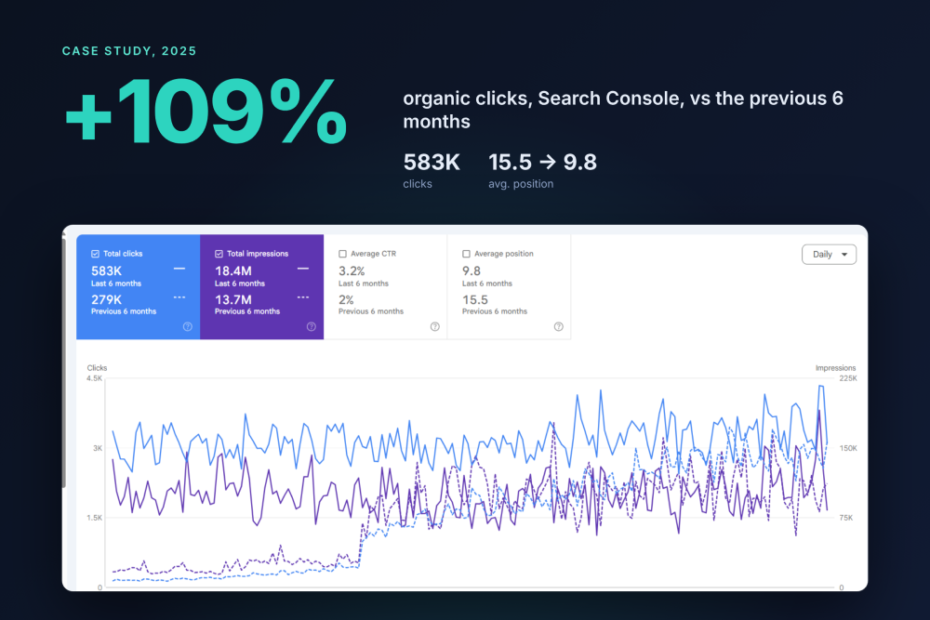
The sequence below comes from operator-side work, including a large marketplace whose organic clicks rose from 279K to 583K over six months after it cut its indexable URLs. The full numbers are in the case study near the end.
What is marketplace SEO?
Marketplace SEO is the work of controlling which generated pages Google crawls, indexes and ranks. Those pages include categories, locations, filters, listings and seller profiles. The work applies to a site where sellers supply the listings and the operator owns only the templates. Airbnb, Etsy, Tripadvisor and Zillow all grow this way, because each multiplies a small set of templates by a large, changing inventory.
The term serves two audiences who need different advice. Operators optimize their own domain for Google, which is the subject of Steps 1 to 9. Sellers on Amazon or Etsy optimize listings for that platform’s internal search, which ranks by the platform’s own rules and is covered in the seller section below.
A typical marketplace runs seven page templates: listing, category, seller, search, filter, sort and expired pages. Every rule in this guide is set per template. That is because a single markup, linking or indexation change applies to every URL that template produces.
Step 1: Audit indexation by template
Start by finding out which templates Google ignores, because every later step depends on that baseline and you cannot write rules for URLs you have not grouped. A site-wide total hides the pattern that matters. Listings can be healthy while location pages are 90% excluded, and a single averaged number sends you to the wrong fix.
How to do it
- Group URLs by template: listing, category, seller, search, filter, sort and expired.
- Open the Page indexing report in Search Console, because it lets you compare indexed against excluded URLs for each template.
- Sample the excluded URLs for each template and read the reason Google gives, since the reason tells you which fix applies.
- Crawl at least five example URLs per listing category in Screaming Frog with JavaScript rendering on, to confirm Google sees the listings your users see.
- Open the Crawl Stats report under Settings, then confirm it with server logs filtered to Googlebot, since logs show which URL patterns receive requests and Search Console summarizes them only in part.
- Save the numbers with a date, so that Step 9 has a baseline to compare against.
Also read: JavaScript Rendering in marketplaces
How to read the reasons
“Crawled, currently not indexed” means Google fetched the page and judged it not worth storing, which points at thin or duplicated content. “Discovered, currently not indexed” means Google knows the URL but has not fetched it, which points at limited crawl capacity or weak internal links.
When one reason concentrates in one template, it tells you which policy rule to write in Step 2. Filter pages piling up under “Crawled, currently not indexed”, for example, call for a supply or demand threshold on filters. Listings stuck under “Discovered” call for better crawl paths in Step 5.
Step 2: Write the indexation policy
Write one policy per page type before you change any URL, because canonicals, sitemaps and internal links all implement it. Without a written policy, developers ship rules page by page and nobody can explain why a given URL is indexed.
The policy covers top-level categories, subcategories, location pages, filter combinations, individual listings, seller profiles, search result pages and expired listings. For each, it states index or noindex, the canonical target and the condition that changes the answer. Apply controls in a fixed order of preference. Delete (404 or 410) pages with no value to anyone. Noindex thin pages unrelated to a stronger page. Canonicalize low-value pages that do relate to one. Disallow pure crawl waste in robots.txt. Index pages with clear demand, unique value and a stable existence.
| Page type | Demand signal required | Default directive | Re-check trigger |
|---|---|---|---|
| Top-level category | Search demand from keyword research | Index | Inventory change |
| Category plus location | Relative impression threshold | Noindex until threshold met | Live listing count crosses threshold |
| Single-filter facet (brand, color) | Relative monthly search threshold | Index with demand, else canonical | Quarterly keyword review |
| Multi-filter combination | Not applicable | Canonical to parent | Demand appears for exact phrase |
| Seller profile | Not applicable | Index with unique content, else noindex | Profile content added |
| Internal search results | Not applicable | Noindex | None |
| Expired or sold listing | Not applicable | 410, or 301 to close substitute | Listing status change |
A location page noindexed at launch should become indexable once its supply crosses the threshold, and the template should flip the tag automatically so nobody edits pages by hand. Every new URL pattern or feature should pass the policy before it ships, or the cleanup repeats with each release.
Set supply thresholds
Set a minimum live-listing count below which a page is noindexed. At the floor, a page must consistently return at least one active listing, because an empty results page reads to Google as a soft 404. Above that floor, the right number differs by vertical, since a pet marketplace and a property portal give users different expectations of a useful results page, so copying another site’s figure is unsafe.
Test your threshold by comparing impressions and indexation for pages just above and just below it. If pages just below the line earn impressions once indexed, lower it. If pages just above it stay under “Crawled, currently not indexed”, raise it.
Collect demand evidence
Keyword research for a marketplace answers one question per combination: do people search for this exact phrasing? Pull Search Console impressions by URL pattern, then check monthly volume in Ahrefs or Semrush (Semrush plans start from $139.00 per month) for combinations you do not yet index. A combination with measurable searches for its exact phrasing, such as “used Toyota Corolla Denver”, justifies a static URL, while one with no query history stays a parameter view.
Check the intent behind each phrase as well as its volume. If the top Google results for a combination are guides or single product pages, a category listing page will struggle to rank for it regardless of how many listings it holds.
If your marketplace is new
A two-sided marketplace starts with a cold-start problem: buyers arrive only when supply exists, and sellers list only where buyers are. Thin supply limits what you can index at launch, because a city with three listings produces a page Google will probably leave out of the index.
Index top-level categories and your two or three densest locations first, and keep the rest noindexed until they meet the threshold. A new category page often gets indexed within a week when you link it directly from an established parent page, include it in the category XML sitemap and submit it through the URL Inspection tool in Search Console, though the timing varies by site. Expand the policy as those pages earn impressions.
Step 3: Control facets and filter URLs
Apply the policy to filters first, because faceted navigation is the main reason URL counts explode. Facets let users narrow a category by price, condition, color or distance. Each combination can produce its own URL, so five filters with ten values each can create far more crawlable pages than the category has products.
Decide which URLs are static and which are parameters
A clean URL for an indexable page is a static path such as /category/subcategory/property/, whereas a query string such as ?category=value&sort=price&page=3 signals a transient view. Give static paths to pages you want ranked, because everything else should stay a parameter.
A combination earns a static path when the demand evidence supports it and enough live listings exist to fill it. The filter attribute also has to be populated across most live inventory in that category (this guide uses 85% as a working rule), since a sparsely filled attribute produces empty filter states. Link each static filter page from its parent category, and leave the remaining combinations reachable only through the filter interface.
Choose one method for every URL pattern that stays a parameter view:
| Method | Stops crawling | Passes link signals | Crawl cost |
|---|---|---|---|
| Canonical tag | No | Mostly consolidated | Google still crawls |
| Noindex meta tag | No | Fades over time | Google still crawls |
robots.txt disallow |
Yes | No | Lowest |
Canonicals suit near-duplicate views such as sort orders, and noindex suits pages users need that Google does not. Disallow protects crawl capacity. However, Google cannot read a noindex or canonical tag on a URL it is blocked from fetching, so never combine a disallow with either tag on the same pattern. Noindex every combination beyond a set number of stacked filters. Merge facets that split one intent, such as price and year variants of the same category.
Pagination and international versions
Google no longer uses rel="next" and rel="prev", so each paginated page of a category needs a self-referencing canonical. Canonicalizing page 2 to page 1 tells Google to ignore the listings that appear only on page 2, which cuts their crawl path.
If you run the marketplace in several languages or countries, hreflang tags link each version to its equivalents and to itself, and every version must link back. Put hreflang only on indexable, canonical URLs, because a tag pointing at a noindexed or redirected page is ignored.
Step 4: Resolve duplicate listings
Once filters are under control, deal with the other source of near-identical pages, which is one product listed by several sellers. Consolidate those sellers onto one canonical product page that lists each seller’s offer, and identify the product by its GTIN or manufacturer part number. Then canonicalize seller-specific URLs to that page, so that links, reviews and engagement collect on one URL.
Keep a seller page separate and indexable only when it carries something the canonical page lacks. Examples are a used item with its own photos, a local seller in a different city, or a distinct condition. Each kept page needs text that no other page on the site repeats.
Duplicate seller descriptions do not usually trigger a penalty. They do leave pages with nothing to tell them apart, so Google often leaves them out of the index. Your listing template can prevent the duplication by requiring a minimum description length and a condition field before publication.
Step 5: Fix crawl waste, sitemaps and internal links
With the policy and duplicate rules in place, make Google’s crawling follow them. A crawl budget free of waste, a sitemap that mirrors the policy and internal links that point only at indexable pages together steer Googlebot toward the URLs you want indexed.
Check whether crawl budget is your problem
Google’s crawl budget documentation says the concept matters mainly for sites with over one million unique pages that change weekly, or over 10,000 pages that change daily. A marketplace below that size usually has an indexation problem rather than a crawl one, so spend your time on Steps 2 to 4.
Above that size, check what share of Googlebot requests hits filter and sort parameters. When parameters account for more than about 40% of requests, crawl budget is probably being wasted (a working rule of thumb, not a Google figure). Sort orders, expired listings that still return 200, URLs with invalid values that return 200 and redirect chains add to that waste. Each request they consume could have reached a new listing.
You cannot force Google to crawl faster. Crawl demand rises when pages are popular and updated, so fresh listings, strong internal links and fewer low-value URLs raise crawling more than any request tool. Google’s Indexing API supports only JobPosting and BroadcastEvent pages, which rules it out for standard marketplace listings.
Make the sitemap mirror the policy
List only URLs the policy says to index, and exclude redirects, noindexed pages, URLs whose canonical points elsewhere and soft 404s. Each sitemap file holds up to 50,000 URLs and 50MB. A large template therefore needs several files named by template and number (listings-001.xml, listings-002.xml), all listed in one sitemap index file that you submit in the Sitemaps report.
Splitting by template lets you filter the Sitemaps report per child file and compare indexed counts template by template. Rebuild the sitemaps whenever the policy changes. A very low ratio of organic traffic to sitemap URLs signals a sitemap inflated with URLs Google will never crawl.
Link only to indexable pages
Internal links from categories to locations and filters should follow the policy. Links to noindexed pages send crawlers toward URLs you have asked Google to ignore. Listings kept out of the index still consume crawl while internal links point to them, so remove those links.
Link from the homepage to the category pages with the most strategic value, and keep individual listings off it, since listings expire and categories persist. Category pages, “newest listings” modules and related-listing links then give new listings a crawl path, which should keep every listing within three clicks of the homepage. Vary anchor text in cards and related-item modules, because those anchors repeat on every page of the template.
Step 6: Build templates that stay unique
The policy decides which pages exist, and the templates decide whether the indexable ones differ enough from each other to be worth storing. Category and location pages, seller input forms, schema and page speed are all set once in the template and inherited by thousands of URLs.
Category and location page templates
Generate differentiating elements from live data: listing count, price range, newest listings and local attributes such as average rent or the most common item type in that city. Two location pages then differ because their data differs, without a writer tweaking sentences on each one.
Location pages compete when they target the same query. A suburb and its parent city, for example, may both chase “apartments in Austin”. Give each page a distinct primary term, and canonicalize or noindex the weaker one. Run a cannibalization check to find near-identical pages competing for the same queries. Plan category and location templates around semantic clusters tied to business goals.
Seller listing templates and user-generated content
A template can enforce structure that sellers will not supply on their own. Require title attributes (type, brand, condition), specification fields and a minimum description length, and reject submissions below it, so each listing arrives with unique text without anyone editing it.
User-generated content helps when it adds text a competitor cannot copy, and reviews and Q&A do exactly that. It hurts when spam floods the page, so block links for new accounts, rate-limit posting, add rel="ugc" to user links and route flagged content to a manual queue.
Schema markup
Match the schema type to the page. Use Product with Offer for a single-seller listing and AggregateOffer on a product page with several sellers. Add Review and AggregateRating where genuine reviews exist, and BreadcrumbList on category and listing pages. Google recommends JSON-LD because it keeps markup separate from the HTML and is easier to generate from a template.
A multi-seller product page needs a Product object with name and gtin. It also needs an offers property of type AggregateOffer, which carries lowPrice, highPrice, priceCurrency and offerCount. Keep all of a page’s structured data in a single graph, and delete empty JSON-LD blocks, which some templates emit when a field is missing.
<script type="application/ld+json">
{
  "@context": "https://schema.org",
  "@type": "Product",
  "name": "Example product name",
  "gtin": "012345678905",
  "offers": {
    "@type": "AggregateOffer",
    "lowPrice": "129.00",
    "highPrice": "189.00",
    "priceCurrency": "USD",
    "offerCount": "4"
  }
}
</script>
Validate at template level. Test one representative page per template in the Rich Results Test. Then watch the Search Console enhancement reports for errors across the whole template, so that markup errors surface before they spread across thousands of listing pages.
Core Web Vitals for listing and category templates
Page speed is also a template property, since one slow image carousel or script on the listing template slows every listing. Google’s thresholds for a good experience are a Largest Contentful Paint under 2.5 seconds, Interaction to Next Paint under 200 milliseconds and Cumulative Layout Shift under 0.1. Read the Core Web Vitals report in Search Console, which groups URLs by similar pages, and fix the template that drags a group down.
Step 7: Handle expired, sold and out-of-stock listings
Listings expire constantly on a marketplace, so assign every expired listing a status code by rule. The right code depends on whether the item comes back and whether a close substitute exists:
| Situation | Action | Status code |
|---|---|---|
| Recurring or seasonal item | Keep live with alternatives | 200 |
| One-off item, close indexable category exists | Redirect to that category | 301 |
| One-off item, nothing relevant | Remove | 404 or 410 |
Seasonal listings such as a holiday rental or a recurring service keep their links and history if they stay live. One-off sold items rarely return, so their value lies in their links, which a redirect can pass on.
A redirect destination must be indexable, must hold live listings and must not itself redirect, because each extra hop and each noindexed target throws away the signals you meant to pass. Google may treat a redirect to the home page, a broad category or an unrelated item as a soft 404, so redirect only to a close match.
Google treats 404 and 410 almost identically, so pick one and use it consistently. On a high-turnover site, leaving expired listings on 200 inflates the index and wastes crawl requests, while mass 301s to loosely related pages tend to be read as soft 404s.
Step 8: Build authority to categories
Once the technical base is clean, point link building at pages that last. Links to individual listings are lost when the listing expires, so aim external links at categories and the domain.
Google still uses links as a ranking signal; it says PageRank “continues to be part of our core ranking systems”. Earn links without buying them by publishing data from your own inventory, such as price trends by category or city, which journalists can cite, and link each data page to the categories behind it. Pair link building with digital PR for brand mentions, which may also help visibility in AI answer tools.
Benchmark before you build. Compare competitors’ referring domains and most-linked pages, audit your existing backlinks, and set link criteria in advance (market relevance, real organic traffic, editorial placement) so private blog networks and link farms are excluded before outreach starts.
Step 9: Measure, iterate and set expectations
Close the loop against the baseline saved in Step 1. Ship one fix at a time and compare before and after, so you know which rule caused which change.
Compare Googlebot requests per template before and after a change, using logs for precision and Crawl Stats for confirmation. Then compare indexed counts and impressions across equal periods. Count a fix as confirmed only when crawling shifts toward the target templates and indexation follows. A script that compares Search Console exports across periods and grades each finding by severity makes this comparison repeatable.
Recovery on a marketplace with hundreds of thousands of listings typically takes several weeks, and updates arrive unevenly across templates. No verified timeline applies to every new marketplace, because pages cannot be indexed until listings exist to fill them, so the pace of supply growth sets the pace of organic growth.
Case study
In spring 2025 we worked with a large online marketplace that had issues with indexation and cannibalization. Its category, location and filter templates, plus invalid URLs returning 200, made its indexable URL count effectively unlimited. Millions of sitemap URLs were never crawled. Individual listings were linked from the homepage, and internal links had been added in bulk.
Over six months the fixes followed the order of the steps above:
- Indexation policy and facets (Steps 2 and 3): each page type got a rule to delete, noindex, canonicalize, paginate or block. About 25,000 facet variants were removed. Faceted URLs with five or more filters were noindexed, and pagination rules were added to about 60,000 seller directory pages.
- Crawl control (Step 5): URLs that could not be validated now return 404. Test subdomains, API endpoints and the HTML sitemap page were blocked in
robots.txt. - Internal links (Step 5): links moved from individual listings to category pages. Expired listings stopped redirecting to narrow, non-indexable categories.
- Content: redundant articles were removed, the reviews folder was noindexed and the blog was rebuilt into purpose-driven sections.
Search Console results, compared with the previous six months:
| Metric | Before | After |
|---|---|---|
| Clicks | 279K | 583K (+109%) |
| Impressions | 13.7M | 18.4M (+34%) |
| Click-through rate, % | 2 | 3.2 |
| Average position | 15.5 | 9.8 |
Clicks grew three times faster than impressions because the pages that stayed indexed ranked higher, which lifted click-through rate more than it lifted reach.
Free Marketplace SEO Checklist
Work through the checks in step order, since each depends on the one before:
| Step | What to confirm | Where to check |
|---|---|---|
| 1 Audit | Indexed share per template, dated | Page indexing report, logs |
| 2 Policy | Every page type has a directive | Policy document |
| 2 Policy | Thresholds tested above and below | Search Console, Semrush or Ahrefs |
| 3 Facets | Each parameter pattern has one method | robots.txt, page source |
| 3 Facets | No disallow plus noindex together | robots.txt, page source |
| 4 Duplicates | One canonical page per GTIN | Product template |
| 5 Crawl | Parameters under 40% of Googlebot requests | Server logs |
| 5 Sitemaps | Only indexable URLs, split by template | Sitemaps report |
| 5 Links | Listings within three clicks | Screaming Frog crawl |
| 6 Templates | Live data on category pages | Template source |
| 6 Schema | One page per template passes | Rich Results Test |
| 7 Expired | Redirects one hop, to indexable pages | Screaming Frog crawl |
| 8 Authority | One inventory data asset published | Content calendar |
| 9 Measure | One fix shipped per comparison period | GSC delta comparison |
Repeat the Step 1 audit after each policy change, because every new template or feature can reopen a problem you already closed.
Marketplace SEO cost and doing it yourself
Organic traffic is free per click, but the work behind it costs time, tools or fees. You can run Steps 1 to 9 yourself if you can read Search Console, access server logs and get template changes shipped by a developer. Search Console is free, Screaming Frog’s free version crawls up to 500 URLs, and keyword tools such as Semrush start from $139.00 per month.
| Route | Cost | Best for |
|---|---|---|
| In-house, with free and entry tools | From $139.00 per month in tools | Teams with developer access |
| Audit and teardown | Free audit, $997 teardown | A prioritized fix list |
| Agency retainer | $5000+ | Ongoing execution at scale |
If your team can ship template changes, an audit that tells you what to fix first costs less than a retainer. If nobody can ship the fixes, an agency or in-house hire that also executes is the better fit.
Frequently asked questions about marketplace SEO
Should organization schema be on every page of a marketplace?
Put Organization markup on the homepage, where it describes the operator. Seller profile pages can carry their own Person or LocalBusiness markup, kept separate from the platform entity so Google does not confuse a seller with the marketplace itself.
Do backlinks matter for individual marketplace listing pages?
Rarely, because a listing loses its links when it expires and its 301 can pass only part of their value to a close category. Step 8 covers where to aim links instead.
Is programmatic SEO risky for a marketplace?
Programmatic SEO becomes risky when pages are generated without supply and demand checks, because thin pages stay out of the index and pull crawling away from pages that could rank. Require at least one consistently active listing, attribute coverage of at least 85% for filters, and measurable query demand before a generated page is indexable.
Can ChatGPT do SEO for a marketplace?
ChatGPT and other LLMs can draft category copy, cluster keywords and check schema, but they cannot see your Search Console data or ship template changes. Google rewards helpful content however it is produced, while its scaled content abuse policy targets pages mass-produced mainly to manipulate rankings. Keep written guidelines for AI-assisted content and review output against them before it reaches an indexable template.
What is the 80/20 rule in SEO for marketplaces?
The 80/20 rule is a heuristic that a small share of the work produces a large share of the results. On a marketplace, it points you at templates over pages, since one fix to the filter or listing template changes every URL it generates, while editing individual pages changes one at a time.
Is marketplace SEO dead or still worth doing in 2026?
Search is shifting toward AI answers, and those answers still draw on pages that search engines have crawled and indexed. Clean crawling, indexation and site architecture therefore support visibility in both Google results and LLM answer tools.
Why a marketplace is not getting organic traffic
If you do nothing else, run three checks: index coverage by template, crawl waste from filter URLs, and thin category or location pages. They catch the three causes that block organic traffic from reaching a marketplace: pages Google has not stored, pages it never reached, and pages too empty to earn a place in the index.
This week, export the Page indexing report, group the URLs by template and write down the indexed percentage for each. If you want a second opinion on what that baseline shows, I offer marketplace SEO services and hands-on teardown that grades every finding by severity, prioritizes every fix by impact and ends in a written action plan we walk you through on a call.