
A search for running shoes on a multi-seller platform returns five different spellings for navy blue, three separate size scales, and hundreds of blank product records that drop out of the results entirely. The obvious fix of asking sellers to clean up their listings never works because hundreds of independent merchants will never follow an unpoliced style guide.
A marketplace faceted navigation taxonomy solves this by enforcing a category hierarchy paired with governed product attributes and strict mapping rules. Getting this system right lets you present clean, reliable filters to buyers while giving search engines a clear path to high-demand pages instead of millions of junk URLs.
Key Takeaways
- A marketplace taxonomy requires a category tree tied to category-specific attributes and strictly controlled allowed values.
- Inconsistent seller data must be normalized through a mapping layer that standardizes synonyms and units before filters render.
- Attributes only earn filter status when they have high buyer demand, high seller completion rates, and cleanly split catalog results.
- Indexing rules must restrict search engines to high-demand, high-inventory combinations while preventing crawl waste across sort parameters and multi-facet bloat.
- Using
robots.txt, noindex, and canonical tags incorrectly can easily cause search engines to index blank parameter URLs or miss canonical signals.
What is a marketplace faceted navigation taxonomy?
A marketplace faceted navigation taxonomy is a structured framework combining a hierarchical category tree with an explicit set of attributes and allowed values defined for every category. The category tree organizes products into parent and child classifications, while the attributes capture specific item dimensions like brand, material, and size. Faceted search taxonomy rules use this underlying data structure to dynamically generate frontend filters on category listing pages.
This system differs fundamentally from a single-retailer store taxonomy. A traditional retailer employs an internal merchandising team that writes and verifies every product attribute against a centralized style guide before publication.
A multi-seller marketplace, by contrast, ingests product data from thousands of third-party merchants who upload inventory through bulk CSV feeds, third-party aggregators, and custom APIs. Because each seller uses their own terminology, abbreviations, and formatting, the marketplace cannot rely on raw seller input to build site navigation.
Once your taxonomy correctly governs this seller input, you gain control over both user discovery and organic search performance. On the buyer side, the storefront displays coherent, mutually exclusive filter options that return accurate inventory counts. On the search side, SEO leads and product managers can systematically decide which facet pages should be indexed by search engines to capture long-tail query volume, while keeping low-value parameter combinations out of the crawl budget.
How categories and attributes become filters?
A category decides which attributes appear as facets on its page by evaluating category relevance. On a footwear category page, for example, the system exposes facets for shoe size, width, upper material, and closure type.
That same platform suppresses those facets inside a mobile phones category, displaying storage capacity, screen size, operating system, and network carrier instead. Product managers map these relationships inside the marketplace category hierarchy so buyers never encounter nonsensical filters like storage capacity on a pair of boots.
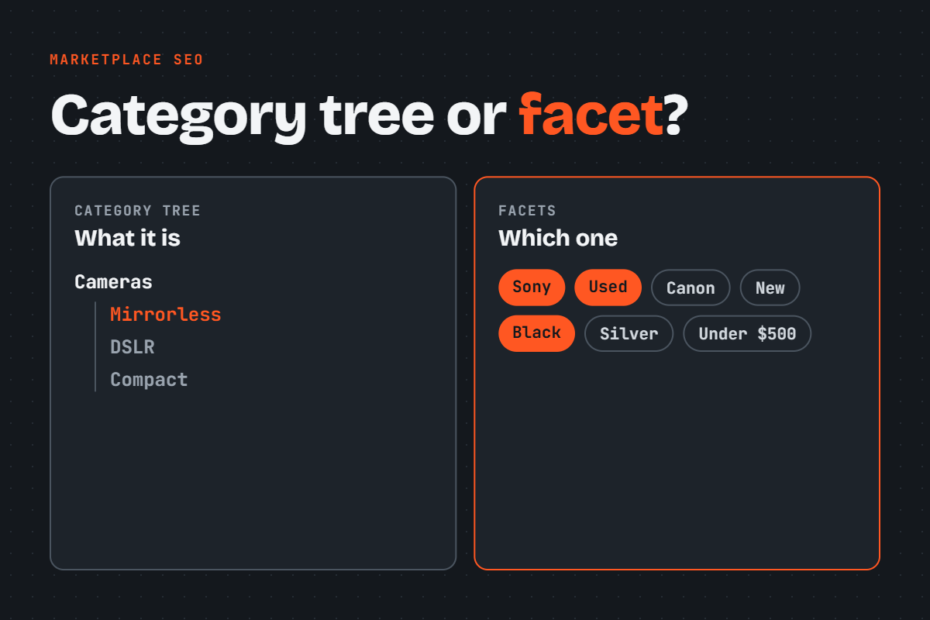
Hierarchical category navigation and faceted navigation divide discovery work across different structural planes. Hierarchical navigation provides a rigid, vertical breadcrumb path that establishes topical parent-child relationships, such as Clothing > Men’s Shoes > Running Shoes.
Faceted navigation operates horizontally across those endpoints, letting users apply non-hierarchical, multi-dimensional refinements such as color, size, and price. Marketplaces require both structures: the tree sets the primary thematic boundary, and the facets let shoppers navigate variations without requiring deep, confusing subcategory branches.
Flat architecture vs deep architecture
The depth of your category tree directly changes the facets each category page can show. A flat category tree stops at broad groupings, requiring a single category page to host dozens of attributes to cover diverse products. This flat model often overwhelms buyers with cluttered filter lists and dilutes the thematic focus of the page.
A deep category tree isolates specialized product types into dedicated branches, allowing the system to display a focused set of four or five highly relevant facets. The trade-off is that deep trees increase listing click depth and risk creating thin subcategories with minimal product inventory.
Ebay example
Large marketplaces manage this balance by enforcing distinct classification layers. For example, eBay uses a structured category system paired with eBay item specifics.
In eBay’s model, selecting a specific leaf category unlocks tailored item specifics, such as “Pattern” or “Sleeve Length” for shirts, which sellers must complete to populate the sidebar filters. Etsy operates similarly with Etsy filters, using a universal category taxonomy that prompts sellers for specific listing attributes based on the exact craft or vintage branch selected during listing creation.
Why inconsistent seller attributes break filters
Free-text seller values split one logical filter option into several competing facets. When an e-commerce platform allows open text entry for a color attribute, one merchant submits “Navy”, a second types “navy blue”, and a third enters “Dark Blue”. The frontend faceted search taxonomy treats these entries as three distinct values, forcing the user to select three separate checkboxes just to see every dark blue item in the catalog.
Missing or misplaced attributes silently drop listings from filtered results. If a merchant neglects the “Shoe Size” field and types “Size 10” only inside the product title or description, the faceted navigation engine cannot parse the data. When a shopper filters the category by size 10, the database query excludes that unassigned listing, leaving the seller without impressions and the buyer with an incomplete inventory view.
Mixed units and irregular formats break range filters and sorting logic. When sellers submit phone storage as “64 GB”, “64gigabytes”, “64G”, and “0.064 TB”, numeric slider filters fail to parse the strings into a single comparable scale. The platform cannot correctly sort products from lowest to highest capacity, resulting in erratic search results where a 128 GB device appears below a 64 GB model.
These data failures damage both shoppers and search engines:
- Buyer experience: shoppers encounter duplicate filter labels, broken range sliders, and artificial out-of-stock scenarios where products disappear behind incomplete facets.
- Search engine performance: crawlers discover thin, near-duplicate parameter pages generated by fragmented synonym values, which dilutes link equity and triggers crawl bloat across low-value URLs.
A search engine that spends its crawl capacity evaluating dozens of near-duplicate attribute combinations misses high-priority category and product pages.
Normalizing seller attributes into one facet schema
Attribute normalization is the engineering layer that translates messy seller inputs into an authoritative, controlled dataset. This normalization must happen across two distinct points in your platform architecture: during seller submission and within an asynchronous mapping pipeline. Relying on only one stage fails because submission checks slow down merchant onboarding, while pure post-processing cannot fix missing data.
Controlled values and synonym mapping
A marketplace must replace free-text submission boxes with controlled vocabulary picklists wherever a standard set of options exists. For attributes like primary color, material, or connection type, the merchant dashboard should restrict manual typing and offer predefined drop-down options.
When processing third-party feeds via API or CSV, the system routes incoming text through a seller attribute mapping layer before the database writes the listing:
- Synonym lookup tables: map common spelling variations, regional dialects, and merchant jargon to an authoritative taxonomy value (for example, mapping “espresso”, “chocolate”, and “mocha” directly to the parent facet “Brown”).
- Regex extraction rules: scan unstructured product titles and bullet points to detect misplaced values, such as identifying “10.5 M US” in a title and parsing it into size and width fields.
- Automated unit conversion: parse numeric fields and transform mixed measurement systems into base storage units (converting inches and centimeters into standardized millimeter values, and megabytes into gigabytes).
Required attributes per category
Platform managers must identify the core attributes that power primary buyer filters and mark them as strictly required at listing creation. If color, shoe size, and brand generate 80% of filter clicks in Footwear, a seller should not be able to publish a listing in that category without supplying valid values for those three parameters. Enforcing mandatory attributes at the point of ingestion guarantees that new inventory remains visible within the faceted navigation taxonomy.
Managing legacy listings and external bulk feeds requires a phased data remediation process:
- Weak legacy handling: leaving unpopulated fields empty indefinitely, which hides older listings behind faceted navigation.
- Strong legacy handling: running bulk algorithmic backfills using product titles, followed by setting seller dashboard notifications to review unmapped listings.
Flag any legacy record missing mandatory attributes with an “Uncategorized Attribute” internal status. Then, provide sellers with bulk-editing spreadsheets that isolate these missing fields. If external API feeds fail to supply mandatory attributes, route those listings into a temporary staging queue until the merchant maps the required fields.
Deciding which attributes become filters
Clean attribute data does not mean every field belongs in the frontend navigation menu. Exposing every available product characteristic as a facet clutters the interface and harms the browsing experience. Attribute selection must be governed by three quantitative thresholds:
- Buyer search and filter usage: internal site search queries and click-tracking logs show which characteristics shoppers actively evaluate during purchase journeys.
- Seller completion rates: the attribute must be populated across at least 85% of live inventory in that category to avoid empty filter states.
- Result set distribution: the attribute values must divide category inventory usefully rather than clustering 99% of items into a single option.
A category page should balance discovery power with cognitive load by displaying only a focused group of facets. Keep the total number of exposed facet groups on a category page to a reasonable threshold, typically between 6 and 10 attribute blocks. Showing 25 open filter accordions forces buyers to scroll through irrelevant parameters and slows page performance.
Facet order and default visibility should follow this same usage data. Place the highest-frequency filters, typically brand, price, and category-specific sizing, at the top of the navigation sidebar with their options expanded by default. Collapse secondary or niche attributes (such as pattern or closure type) inside expandable menus further down the page to keep the primary interface clear.
Which facet pages Google should index?
Faceted navigation requires strict limits on which filter parameter combinations search engines can discover and index. A large marketplace with thousands of products across hundreds of categories can easily generate millions of parameter URLs. Without clear controls, faceted search taxonomy links lead crawlers into infinite parameter traps that drain crawl budget and dilute search authority.
A facet combination should earn an indexable URL only when it meets both of these requirements:
- Demonstrated organic search demand: verified third-party search volume exists for the exact category-plus-attribute pattern (such as “women’s leather jackets” or “cordless drills 18v”).
- Sufficient live inventory: the resulting page consistently returns at least one active listing.
If filter and sort parameters like ?sort= and &page= account for more than about 40% of Googlebot requests, your crawl budget is being wasted. To limit that waste, multi-facet stacking (such as selecting brand, color, size, material, and price simultaneously) must never produce indexable URLs. These combinations rarely carry external search demand, and they fragment catalog inventory into thin or empty pages.
When a high-demand attribute combination qualifies for search visibility, convert it from a raw query parameter URL into a clean, permanent subcategory page. Instead of indexing /shoes?category=running&brand=nike&color=black, create a dedicated landing page at /shoes/running/nike/black/. This permanent URL must feature a unique H1, tailored metadata, static breadcrumbs, and introductory copy.
robots.txt, noindex and canonical for facet URLs
Managing the facet pages that do not deserve indexing requires choosing the right directive for each specific parameter type. Marketplaces must apply these technical controls systematically across their category listing templates.
The following table outlines how search engines handle each control mechanism and where to deploy them across a marketplace architecture.
| Control | Stops Googlebot crawling the URL | Keeps the URL out of Google’s index | Consolidates ranking signals to another URL | Best for on a marketplace |
|---|---|---|---|---|
robots.txt disallow |
Yes | No | No | Infinite combinations, price sliders, internal search endpoints |
| noindex meta tag | No | Yes | No | Low-demand single facets, thin inventory filters |
| rel=canonical tag | No | Sometimes | Yes | Sorting options, pagination, alternative gallery views |
| URL fragment or non-link filter | Yes | Yes | No | Minor interactive refinements, multiselect checkboxes |
| Indexable static landing page | No | No | No | High-demand single-attribute and dual-attribute combinations |
Selecting the wrong control from this table creates immediate technical failure points.
A common point of failure is misunderstanding the difference between robots.txt and noindex directives. A robots.txt disallow instruction stops search engine bots from fetching the contents of a page, but it does not prevent indexing. If external or internal links point to a disallowed URL, Google can index that URL purely on citation data, displaying it in search results without a meta description.
Conversely, a noindex meta tag keeps a page out of the search index, but search engines must be able to crawl the URL to read that tag. If you block a facet URL in robots.txt while adding a noindex tag to its HTML, Googlebot never fetches the page and never reads the instruction. The disallowed URL remains vulnerable to indexation.
The rel=canonical tag suits facet variations that show substantially similar content, such as a category sorted by price or customer rating. Google evaluates canonical tags as suggestions rather than strict directives. If a faceted page filters out most of the parent category’s inventory, Google may treat the page as fundamentally unique and ignore a canonical tag pointing back to the broad parent URL.
For minor refinements like interactive multi-checkboxes, generate URL fragments using a hash symbol (#) or process the filtering via client-side JavaScript without exposing standard <a> href links. This prevents search engines from discovering the URL string altogether, completely eliminating unnecessary crawl overhead.
Auditing an existing marketplace taxonomy
With those controls in mind, auditing a large marketplace taxonomy means checking where your current setup falls short. That requires examining database attribute tables, crawl access logs, and search performance reports.
Begin by running an inventory audit across your product catalog database to identify data duplication. Query listing attribute tables for values with duplicate word stems, disparate casing, and low listing counts across all categories.
Extract every unique entry for high-volume attributes like brand, color, and size into a spreadsheet, then sort by frequency. If single-use entries account for a high percentage of your attribute database, your listing intake lacks controlled vocabulary validation.
Next, identify unwanted facet indexation using Google Search Console and log files. Open the Pages report in Search Console, view indexed pages that are not submitted in your sitemap, and filter them by common parameter strings like ?, &, sort=, or filter=.
Cross-reference this list with server access logs to identify parameters consuming crawl budget. If parameter requests represent more than of Googlebot activity, search bots are trapped in non-canonical facet spaces.
Prioritize your taxonomy fixes in this order so your most valuable categories get clean data and clean crawl paths first:
- Sort by business value: start remediation on the categories and product lines that generate your highest revenue and user traffic.
- Enforce input controls: lock down free-text fields in those high-priority categories with controlled values and mandatory attributes first.
- Clean crawl paths: implement proper canonical tags on sort parameters, configure
robots.txtrules for deep facet combinations, and build static, indexable landing pages for proven search queries.
A structured audit reveals the exact technical bottlenecks holding back your marketplace navigation and organic search performance. I offer a free SEO audit covering what holds your content back, along with a hands-on technical teardown for $997 that grades every taxonomy issue by severity and delivers an actionable plan.